Project management and time tracking in Odoo
Manage customer projects, tasks and timesheets in one place in Odoo. See how work is progressing and whether the agreed hours will cover the work ahead. If the scope grows, you can agree any extra work with the customer before you continue. For work billed by the hour, the sales order shows which hours still need to be invoiced and lets you create the invoice directly.
Explore the example project Discuss your project workflow
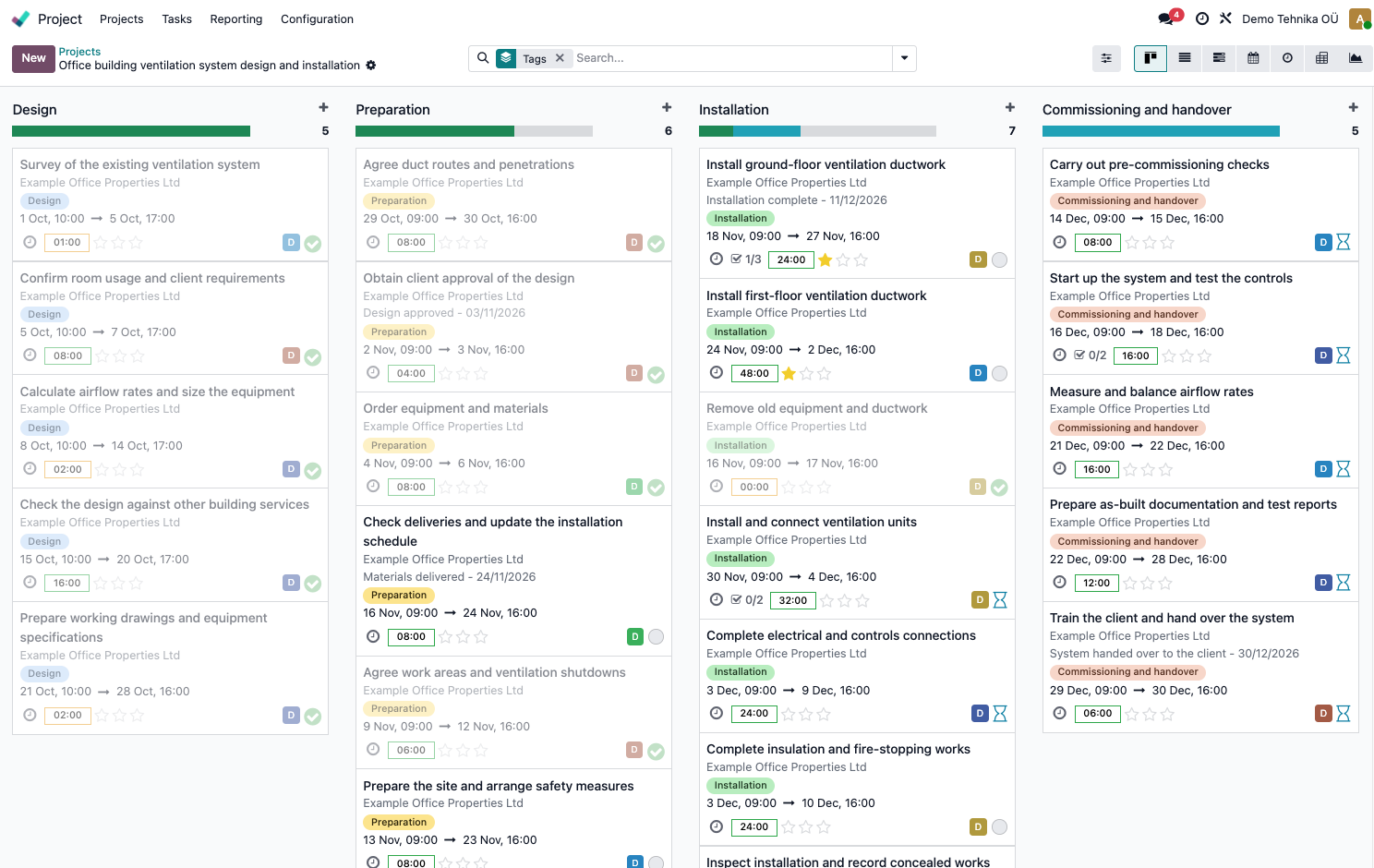
How is work progressing across your customer projects?
Project managers can see which tasks are waiting to start and which need customer feedback. Team members can open a task to see its deadline, what has been agreed and what work is already complete.
Break the work into tasks
Assign each task to someone, set a deadline and link tasks that depend on each other. For example, the installer can see that work on the ventilation unit can only start once the delivery has been checked.
Keep decisions with the task
Attach a file and add the customer’s instructions to the task. A colleague taking over the work can see exactly what was agreed.
Log time against tasks
Each team member records the date, time spent and a brief description of the work. The project manager can see where the time went.
Spot potential overruns early
Compare the hours logged with the original estimate. If the scope needs to change, you can discuss it with the customer before the next phase begins.
How does a customer project go from quotation to invoice?
In the office ventilation project, the sales order shows the hours recorded for each type of work. Equipment and installation materials appear on separate lines. You can use the same approach for a consultancy project or a marketing campaign, agreeing the scope of work with the customer and recording the time spent on each task.
1
The customer accepts the quotation
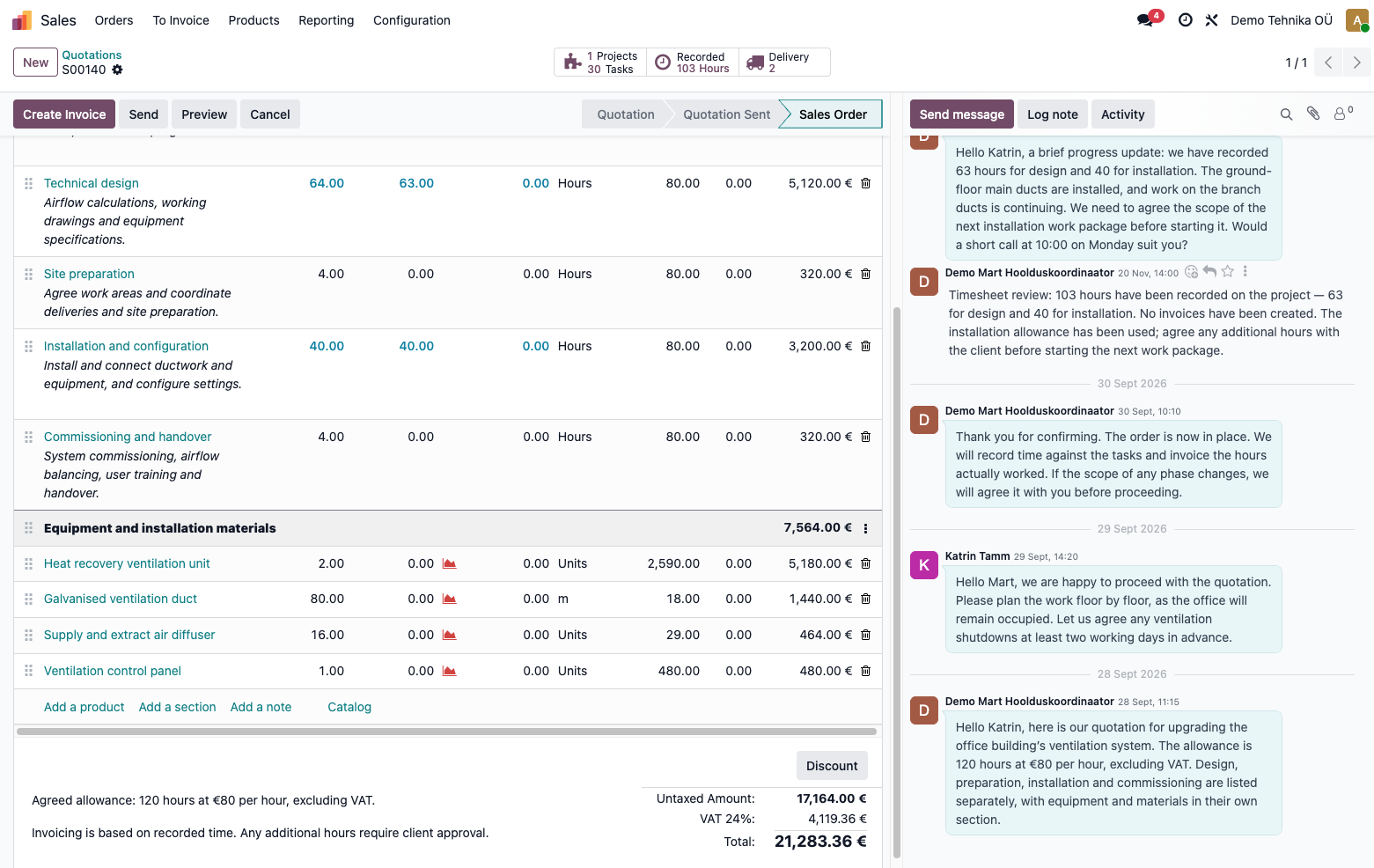
The customer accepts a quotation for 120 hours. The sales order shows the project manager how those hours are split between the different types of work.
2
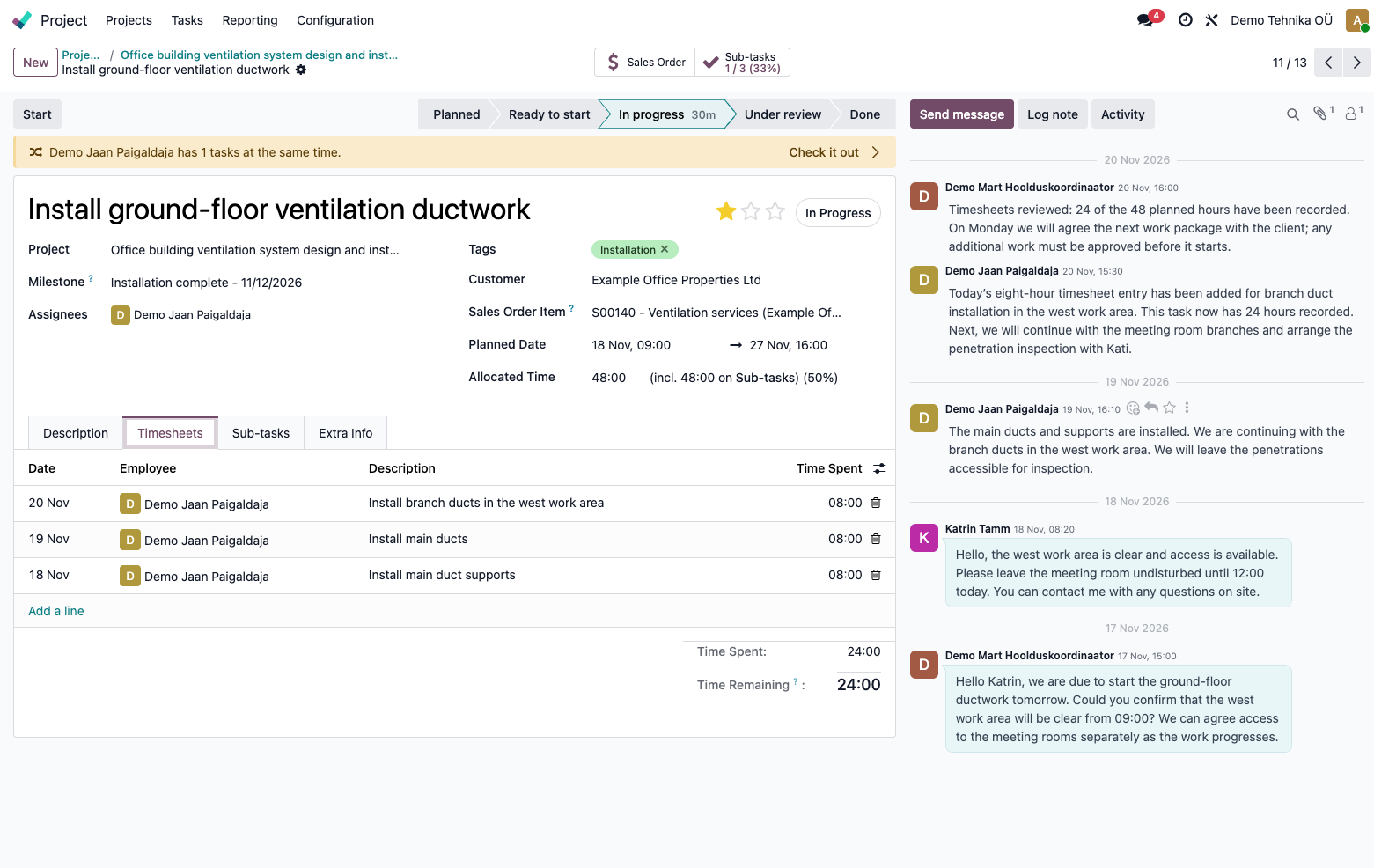
The installer records their hours
The installer opens the task, describes the work and records the time spent. They can also see previous time entries for the same task.
3
The project manager checks the hours used
The team has used all 40 hours agreed for installation and configuration. Before work continues, the project manager agrees the scope of any additional work with the customer.
4
The hours are ready to invoice
The sales order shows the hours worked and the hours already invoiced. The project manager can check the figures before creating an invoice.
Team member’s view of a task
Project manager’s view of the confirmed quotation
What can customers see in their portal?
When you share a project, customers can track the tasks you give them access to. If you bill by the hour, you can also show them the time entries linked to their order or invoice. They can see how the work is progressing and what they are being charged for.
How does a project connect to sales and invoicing?
Odoo links the service the customer orders to the work your team does and the invoice you send. How you invoice depends on what you agree with the customer.
From quotation to project
You can set up a service so that confirming the order creates a project or task. Your team can start work directly from that order.
Invoicing by the hour
Team members log time against their tasks. The sales order shows the project manager how many hours still need to be invoiced, so they can bill the customer at the agreed hourly rate.
Fixed-price invoicing
You agree the project price with the customer before work begins. The hours your team records show the project manager whether the work is taking as long as planned.
Is the project profitable?
Compare project revenue with the cost of labour, materials and subcontracted work. Set each employee’s hourly cost and link purchases and sales to the project. You can then use actual costs when preparing your next quotation.
Why choose Esrap for Odoo project management?
Using one of your typical customer projects, we show you how the team uses the information from an accepted quotation through to the first invoice.
Choose how you get started
If you wish, we can set up one project and time tracking as part of your sales solution. You can then explore Odoo yourself, ask us for advice at an hourly rate or agree a scope for Esrap to manage the implementation.
Choosing the right Odoo edition
If Community meets your needs, we recommend it. If you need a Gantt chart to schedule work or a way to approve timesheets, we show you how these features work in Enterprise and what the licence costs.
Custom development for the way you work
We explain how Odoo’s standard features can support your workflows. If you need more, we can help you choose a suitable add-on or design and build a custom solution.
Your AI tool for project work in Odoo
We connect your AI assistant to Odoo and show you how to use a confirmed quotation to create a project with tasks, assignees and deadlines.
Pricing
You can set up project management yourself and ask us for advice when you need it, or agree a scope with Esrap and let us manage the implementation.
Self-managed implementation
Included in your main solution
Covered by your existing hosting fee for the main solution.
If you choose Esrap’s Odoo sales solution, we can set up one project and time tracking in the same Odoo environment on request. This work is included in the price of the sales solution.
Explore the sales solution- We set up one project alongside your sales solution.
- We set up time tracking so your team can log hours against tasks.
- If you need help, we work through your questions with you in your Odoo environment. We charge for the time spent.
Esrap-led implementation
By quotation
€45 / month + VAT
Before we start, we agree which work Esrap will carry out, what we will deliver and how much it will cost. The implementation can include the following services.
Discuss your implementation- We review how your team works and recommend improvements.
- We configure Odoo and use one of your customer projects to show how work moves from quotation to invoice.
- We develop any custom features we agree you need.
- We train your team using examples from their day-to-day work.
Self-managed implementation
Included in your main solution
Covered by your existing hosting fee for the main solution.
€22.90 / user / month + VAT
€27.90 *
If you choose Esrap’s Odoo sales solution, we can set up one project and time tracking in the same Odoo environment on request. This work is included in the price of the sales solution.
Explore the sales solution- We set up one project alongside your sales solution.
- We set up time tracking so your team can log hours against tasks.
- If you need help, we work through your questions with you in your Odoo environment. We charge for the time spent.
Esrap-led implementation
By quotation
€45 / month + VAT
€22.90 / user / month + VAT
€27.90 *
Before we start, we agree which work Esrap will carry out, what we will deliver and how much it will cost. The implementation can include the following services.
Discuss your implementation- We review how your team works and recommend improvements.
- We configure Odoo and use one of your customer projects to show how work moves from quotation to invoice.
- We develop any custom features we agree you need.
- We train your team using examples from their day-to-day work.
* With annual billing, the first 12 months cost €22.90 per user per month. The standard rate is then €27.90 per user per month. Prices exclude VAT.
An Enterprise licence also gives you access to apps such as Odoo Accounting, Subscriptions and Field Service. View licence pricing
Only need project management and time tracking? Tell us how your team currently plans work and records time. We’ll give you a separate quote for setting up project management and time tracking.
Tell us about a typical customer project and how you invoice for it. We’ll help you choose a suitable setup.
Discuss your project workflowFrequently asked questions
Choose self-managed implementation if your team wants to explore Odoo, try different ways of working and decide how to manage projects and track time. If you wish, we can set up one project and time tracking as part of your sales solution. If you need advice on a setting or a particular task, we charge for the time spent helping you.
Choose Esrap-led implementation if you would like our help reviewing your workflows and configuring Odoo. Together we look at how your team plans work, records time and invoices customers. Before we start, we agree what Esrap will set up, how we will train your users and how much the implementation will cost.
Odoo Community suits teams that want to break a project into tasks, assign each task to someone, set deadlines and track progress on a Kanban board. Team members can log time manually against tasks, and the project manager can compare the hours recorded with the original estimate.
Odoo Enterprise adds a Gantt view where the project manager can see which tasks overlap and adjust their timing. Team members can start a timer on a task or enter their hours for the week in a single grid. If your company requires timesheet approval, the person responsible can review and approve the entries.
Yes. For each service, you can choose whether confirming a quotation creates a new project or adds a task to an existing one. For example, an installation order can start a new customer project, while a consultancy order can add a task to the customer’s ongoing project. In both cases, your team can see which sales order the work relates to.
No. For example, you can manage consultancy work for several customers in one project by creating a separate task for each order. If you bill by the hour, link the task to the correct sales order line so that time recorded against the task appears on the customer’s order.
A separate project is useful when an order involves several phases, different people responsible for the work and multiple deadlines. The project manager can then track progress across the whole order in one place.
The team member opens the task and enters the date, a brief description of the work and the time spent. The project manager can see all the time entries on the task and compare the total hours recorded with the time allocated.
The sales order shows the hours ordered and the hours recorded side by side for each service. If the customer agreed to 64 hours of design work and the team has recorded 63, one hour remains for design.
Yes. Your team can record hours against tasks even when you have agreed a fixed price with the customer. The project manager can compare actual hours with the estimate and see which tasks took longer than expected.
For example, if design work takes 24 hours instead of the 20 planned, the project shows all 24 hours. You invoice the customer at the agreed price. When quoting for similar work, you can base your estimate on the time the job actually took.
Yes. Agree with the customer what you will deliver at each milestone and what share of the project price you will invoice. For example, you could invoice 30% once the customer approves the working drawings and the remaining 70% once you hand over the system.
In Odoo, you link these milestones to the sales order. Once you mark a milestone as reached, you can create an invoice for the agreed amount from the sales order.
Link the billable task to the relevant service line on the customer’s sales order. Record internal work against a separate project or task that is not linked to a billable sales order line.
For example, a consultant can log three hours on a customer consultancy task and one hour on an internal training task. All four hours appear on the timesheet. You can invoice the customer for the three hours of consultancy.
Yes. The project manager can check which task each team member logged time against, how they described the work and how many hours they recorded. They can also check that the hours are linked to the correct sales order line.
If you want to invoice only the hours approved by the project manager, we can review the options available in your Odoo edition with you and agree on a suitable approval process.