Put AI to work in your business with Odoo
Give your AI assistant a task in your own words. It can find the information it needs in Odoo and use it to prepare a quotation, check a supplier bill or create project tasks. Your team spends less time looking for information and entering data by hand.
You can also schedule recurring tasks or trigger them when something happens in Odoo. You decide what AI can do on its own and when a member of your team needs to give approval.
See examples Discuss your workflow
Two ways to use AI with Odoo
Once connected to Odoo, your AI assistant can work with your business data and save the results directly in Odoo. For example, an assistant can use the products and customer’s price list in Odoo to draft a quotation for the salesperson to review before sending. You can give the assistant the task yourself or have an Odoo workflow trigger it.
Give your assistant a task in your own words. It can look up information in Odoo, draft documents and create or update records. You can refine the result in the conversation and schedule recurring tasks.
Ask questions and assign tasks
Ask about your Odoo data, request a draft or have your assistant create a project and its tasks in Odoo.
Limit access to data
When setting up the connection, we agree which Odoo data the assistant may read and which data it may share with the AI service.
Set separate permissions for changes
You can give the assistant permission to look up information. You can grant separate permission to create tasks or update existing records.
Schedule recurring tasks
You can schedule the same instruction to run every Monday, for example. The same permissions apply to scheduled tasks.
AI can get to work when something happens in Odoo or when a team member clicks a button. For example, it can categorise an incoming customer enquiry by its content, extract information from a document or summarise notes.
Choose when AI runs
A workflow can start when someone clicks a button, when a new document arrives or at a scheduled time.
Choose the data AI uses
We select the fields and documents each workflow needs. The subject and body of an email may be enough to classify an enquiry.
Decide what needs approval
A workflow can tag a record automatically. You can leave a quotation for a salesperson to review and send to the customer.
Make results easy to check
We can set up the workflow to show the AI suggestion and its source document on the Odoo record. If information is missing, the workflow can refer the task to the person responsible.
You decide which data AI can use, what it can do on its own and which actions need a member of your team to approve them.
How can you use AI in your work?
Choose an Odoo solution to see three examples of how AI can help your team in its day-to-day work.
Update purchase prices from your supplier’s price list
Give the AI agent a link to your supplier’s price list and ask it to check for changes each week. It matches items by supplier product code and updates purchase prices in Odoo. If a code or pack size does not match, it flags the item for the buyer to check.
Balance stock across your shops
Every morning, the AI agent compares stock levels and sales rates for each product across your shops. If one shop is running low and another has stock to spare, it suggests how many units to move and between which shops. A warehouse worker can review the suggestion and ask the agent to create an internal transfer in Odoo.
Plan stock replenishment ahead of a holiday
“How many chocolate eggs and gift boxes did we sell in the two weeks before Easter last year? What should we order this year?” The AI agent compares those sales with current stock and deliveries due before Easter, then suggests an order quantity for each product. The buyer can review the quantities and ask the agent to draft purchase orders.
Break a project into tasks and assign them
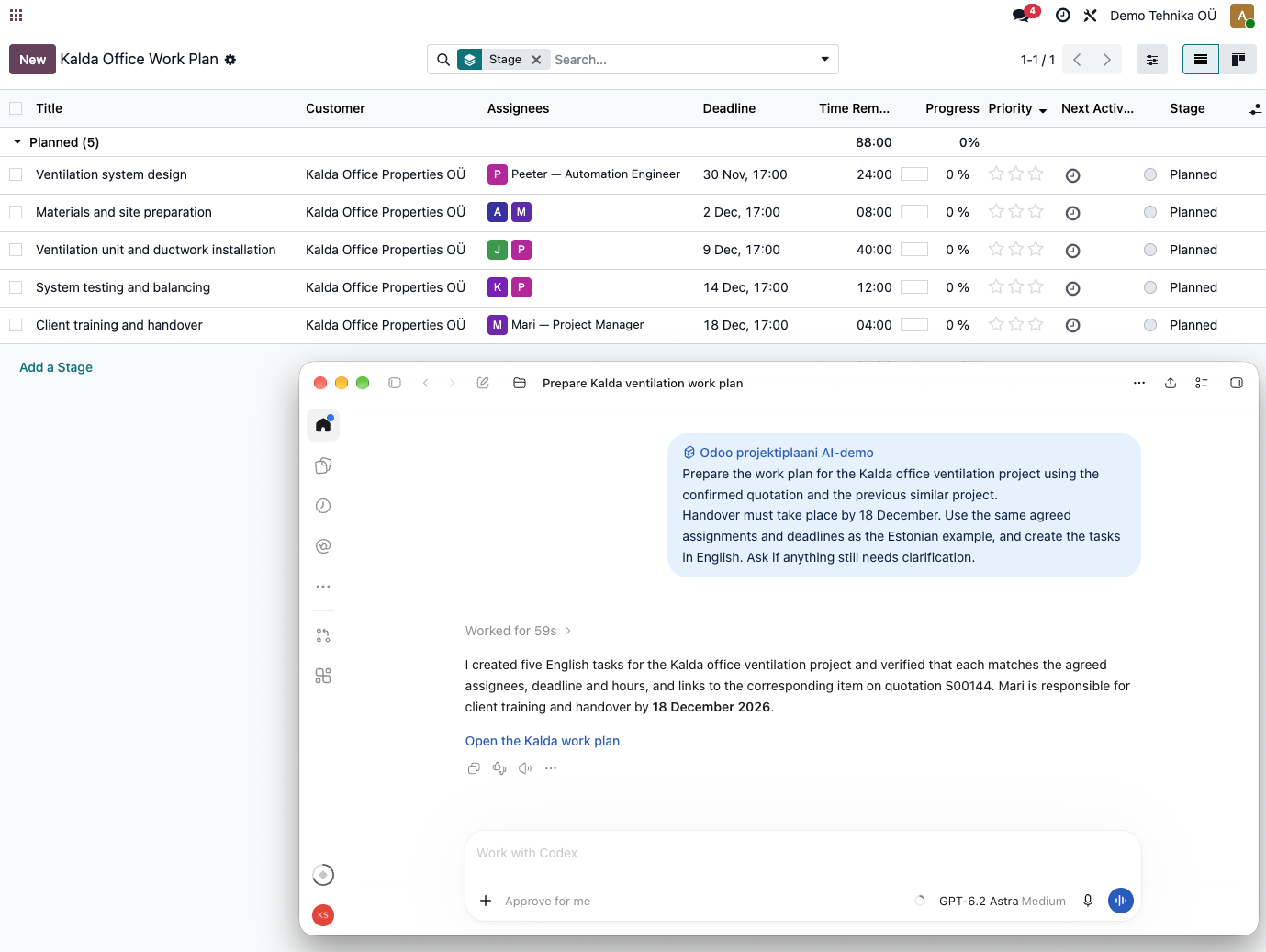
The project manager describes the work. The AI agent also draws on the customer quotation and plans from similar past projects. It creates tasks in Odoo, sets deadlines based on the project schedule and assigns each task to a suitable team member. If an owner or deadline is unclear, it asks the project manager.
Describe your work and let the agent log your hours
“Today I spent three hours installing ductwork on the office building project and half an hour coordinating the work with the client.” The agent finds the relevant project tasks and creates two timesheet entries. The team member reviews and confirms how the time was allocated.
Prepare timesheets for invoicing
At the end of the month, the agent groups unbilled hours linked to the sales order by task. It flags timesheet entries that need a clearer description and uses the remaining entries to prepare a summary of the work for the client.
Prepare for a customer meeting
“I’m meeting this customer tomorrow. What should I know?” The assistant summarises previous orders, open quotations and recent agreements, and highlights questions the customer has yet to answer.
Turn meeting notes into minutes and actions
The salesperson enters their meeting notes. The AI assistant organises them into minutes, highlights what was agreed and saves the minutes in the opportunity’s chatter. It creates Odoo activities for the agreed actions, with an owner and a due date for each.
Monday sales review
Every Monday, the AI agent prepares a summary from Odoo. The sales manager can see which deals the team won or lost last week and which quotations are due for a customer decision this week. The sales manager can use the summary to discuss the week’s results with the team and plan their next steps.
Describe a promotion and let AI set it up
“Offer 15% off all garden tables in our online shop next week.” If any details are unclear, the AI agent asks a question, such as whether the discount also applies to items already on sale. It then sets up the promotion in Odoo so you can check the terms before launch.
Create a new web page with an AI agent
Describe who the page is for and what you want visitors to do. The AI agent creates a first draft in Odoo. Open the preview and give feedback, such as “Move the prices higher up and add an enquiry form.” The agent makes the changes and you decide when to publish.
Review all your product descriptions with AI
“Check all our online shop descriptions for repetition, unclear wording and details that conflict with the product data.” The AI agent shows each issue alongside a suggested edit. Once you approve the changes, it updates the descriptions on the product records in Odoo.
Review supplier bills and payments each morning
Every morning, the AI agent checks new supplier bills against the source documents. It corrects clear data entry errors on draft bills, such as a misread invoice number. When the supplier, amount and payment reference match, it links paid bills to the bank transactions. The accountant receives a brief summary of corrections, matched payments and bills needing a decision.
Find out which invoices a customer paid
“A customer paid €2,400 and the reference just says ‘invoice payment’. Which invoices could it cover?” The agent compares the payment with the customer’s outstanding invoices and explains the suggested match. If several combinations add up to the same amount, it shows the options for the accountant to confirm.
Explain why costs changed
“Why were our transport costs higher in May than in April?” The agent compares the two months, identifies the invoice lines that account for the largest changes and shows which suppliers or deliveries were involved. The accountant can open the source document for each amount.
See how AI works in Odoo
In this video, Odoo introduces ways to use AI in everyday tasks within its apps.
The video is in English. The features available depend on your solution and how it is configured.
How does Esrap help you introduce AI?
One recurring task is enough to get started. Tell us how your team handles it today, where they find the information they need and what result you expect. Together we’ll check whether your existing data is enough for a first trial and what needs tidying up beforehand.
1
Choose a task
We help your team find a recurring task where AI could save time.
2
Check readiness
We check data quality and identify the connections and access the task requires.
3
Design the solution
We choose a tool and agree what the agent can do on its own and what needs approval.
4
Set up and test
We connect your assistant to Odoo or configure a workflow. We test it on real tasks and refine it together.
5
Review the results
We guide your team and review time savings and the quality of the work before deciding where to use AI next.
Pricing
Start with the AI assistant add-on, or work with Esrap to find and implement practical uses for AI in your business.
Self-managed implementation
€400 one-off + VAT
The add-on uses your existing Esrap-hosted Odoo environment at no extra hosting cost.
For a one-off fee of €400 plus VAT, we connect your AI assistant to your Esrap-managed Odoo environment and work through two tasks from your business with you. You can then use the assistant on your own. Depending on the AI service you choose, subscription or usage fees may apply.
Order the AI assistant add-onWhat Esrap does
- We connect a compatible AI assistant to your Odoo environment.
- Together we define which data the assistant may read and which actions it may take.
- We work through two tasks with you, such as finding quotations awaiting a reply and creating a project from a quotation.
Esrap-led implementation
Price on request
€45 per month + VAT
We agree the scope and price before work begins. If we connect an Odoo workflow directly to an AI service, you pay the provider directly for the requests the workflow makes, based on usage.
Discuss your AI implementationServices we can include in the agreed scope
- We work with your team to identify time-consuming manual tasks and agree what a good result looks like.
- Depending on the agreed scope, we set up the AI assistant, configure workflows and develop any custom features you need.
- We test the solution with examples from your business and review what works and what needs improving with the people who use it.
- We make improvements based on feedback, test again where needed and show your team how to use the solution in their daily work.
Odoo Community requires add-ons to connect an AI assistant and use AI in workflows. We connect your assistant to Odoo and configure which data it can read and which actions it can take.
Self-managed implementation
€400 one-off + VAT
The add-on uses your existing Esrap-hosted Odoo environment at no extra hosting cost.
€22.90 per user per month + VAT
€27.90 *
For a one-off fee of €400 plus VAT, we connect your AI assistant to your Esrap-managed Odoo environment and work through two tasks from your business with you. You can then use the assistant on your own. Depending on the AI service you choose, subscription or usage fees may apply.
Order the AI assistant add-onWhat Esrap does
- We connect a compatible AI assistant to your Odoo environment.
- Together we define which data the assistant may read and which actions it may take.
- We work through two tasks with you, such as finding quotations awaiting a reply and creating a project from a quotation.
Esrap-led implementation
Price on request
€45 per month + VAT
€22.90 per user per month + VAT
€27.90 *
We agree the scope and price before work begins. If we connect an Odoo workflow directly to an AI service, you pay the provider directly for the requests the workflow makes, based on usage.
Discuss your AI implementationServices we can include in the agreed scope
- We work with your team to identify time-consuming manual tasks and agree what a good result looks like.
- Depending on the agreed scope, we set up the AI assistant, configure workflows and develop any custom features you need.
- We test the solution with examples from your business and review what works and what needs improving with the people who use it.
- We make improvements based on feedback, test again where needed and show your team how to use the solution in their daily work.
* With annual billing, the first 12 months cost €22.90 per user per month. The standard rate of €27.90 per user per month applies after that. Prices exclude VAT.
In Odoo Enterprise, the AI app lets you create agents and choose which actions they can take. AI fields can summarise notes, and a workflow rule can use AI to categorise incoming enquiries by their content.
If you already host Odoo with Esrap, your existing hosting continues. We agree the scope and price of an Esrap-led implementation before work begins. Any AI subscription or usage charges depend on the service you choose.
Discuss how AI could work in your businessFrequently asked questions
Yes. You decide which data the assistant may read for its task and which of that data it may share with the AI service. Esrap configures the connection accordingly. For example, read access to quotations may be enough to prepare a sales summary. Updating a quotation requires separate permission.
Think of an AI agent as a member of staff following your work instructions. You set out what it should do, when it can take the next step on its own and when it must ask someone for approval. We give the agent the permissions it needs for that work in Odoo.
For example, the agent can compare stock levels across your shops each morning and suggest how many units to move and between which shops. If the instructions require someone to check the quantities, the agent creates the transfer in Odoo only after a warehouse worker approves it.
Yes, provided it has access to the data it needs. For example, a buyer can give the agent a link to a supplier’s price list or upload it as a file. The agent compares those prices with the purchase prices in Odoo. If the price list changes frequently, the agent can be set up to check it regularly.
If the data is held in another system your business uses, we look together at whether an existing integration will work, a new connection is needed or a data export is enough. You decide which data the agent may use and whether it can make changes in Odoo.
Yes. If your team uses OpenAI, Claude or another assistant that supports MCP, you can use the same tool to work in Odoo. MCP is an open standard that enables an AI assistant to retrieve data from Odoo and carry out actions at your request.
You decide which data the assistant may read, which tasks it may carry out independently and when a member of staff needs to give approval. Esrap configures the connection and permissions accordingly.
Together we choose one recurring task and compare how long it takes today with how long it takes with AI. We include the time spent checking and correcting the results.
For example, we can use one supplier’s price list to test how accurately the agent identifies changes in purchase prices and how much the buyer still needs to check manually. You can then weigh the time saved each month against the cost of the solution and decide whether to include other suppliers.
AI capabilities are developing quickly. The sooner your team tries AI in its own work, the easier it becomes to spot where new capabilities can make a real difference to your business.
If Esrap manages your Odoo environment, the one-off fee for setting up the AI assistant add-on is €400 plus VAT. Ongoing charges for using the assistant depend on the pricing of your chosen AI service.
After setup, you can ask Esrap for ongoing advice and help with configuration. For larger development or implementation projects, we agree the scope and provide a separate quotation.
When we build AI directly into an Odoo workflow, we connect Odoo to your chosen AI provider. You pay the provider directly for the requests the workflow makes. The cost depends on the volume of requests and the provider’s rates.
The audit log shows which actions the agent attempted in Odoo via MCP and whether they succeeded. You can also ask the agent to document changes in Odoo Chatter. That way, you can see what the agent changed and what needs your attention directly on the relevant record.
An AI assistant is a good fit when you want to describe a task in your own words and ask follow-up questions about the result. For example, you can ask it to check bills from one supplier and then ask about a particular price difference.
It makes sense to build AI into an Odoo workflow when the task has a clear trigger and you expect the same type of result each time. For example, whenever a new supplier bill arrives, the workflow can compare it with the purchase order and flag any differences for your accountant to review. You can try the task with your assistant first, then automate it in Odoo once it becomes routine.
Start with one recurring task. Describe how your team handles it today, what information the person doing it needs and how they judge whether the work has been done well. Consider which decisions you would like your team to make.
A short description is enough for our first discussion. Together we can choose a suitable trial and agree how to assess accuracy and measure the time saved.
Yes. If you want to change what the agent checks or how it presents the result, you can revise its instructions in your own words. Try out the revised instructions to see whether the result meets your expectations before putting them into use.
If you also need to change which data the agent can access or what it can do in Odoo, we can help you adjust its permissions and the workflow.