Business accounting in Odoo
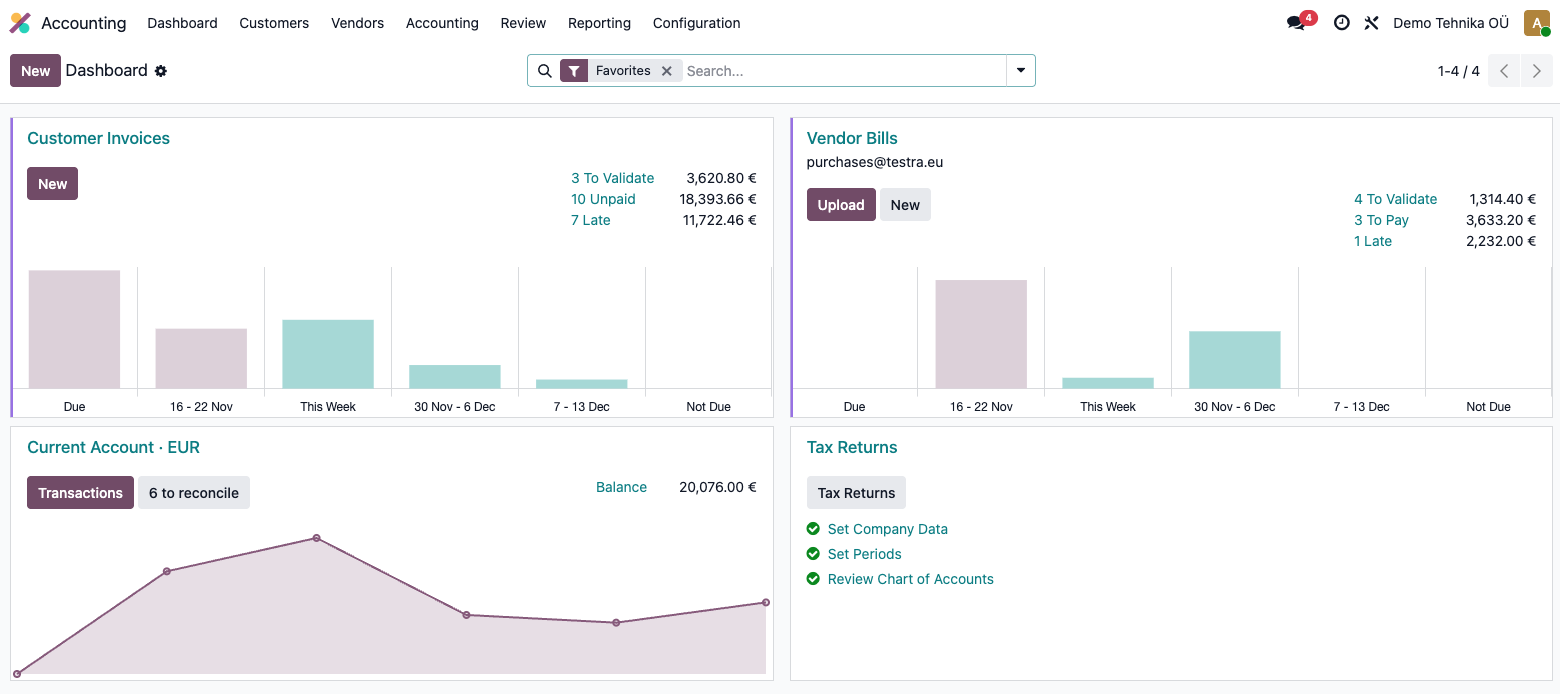
In Odoo, your sales, warehouse and accounting teams work with the same data. You can create an invoice from a sales order at the agreed prices and check a supplier bill against the quantities received. This reduces duplicate data entry. As a business owner, you can see throughout the month which customers owe you money and which bills you need to pay.
See how it works Discuss your accounting setup
What can you do with Odoo Accounting?
Create an invoice from a sales order
The agreed prices and quantities carry over from the sales order to the invoice. If a customer returns some of the goods, you can issue a credit note from the original invoice for the quantity returned.
Check supplier bills
Compare prices on the bill with the purchase order and quantities with the goods received. You can check any differences before confirming the bill.
Match bank transactions to invoices
Odoo looks for the invoice that matches a payment using the reference, customer and amount. You can see which receipts have been matched and which still need checking.
Keep track of payment deadlines
See which customers still owe you money and which supplier bills are due this week. If a customer’s payment is overdue, you can send them a reminder.
See what makes up your monthly result
Open subcontracting costs in the profit and loss statement to see the underlying entries and supplier bills. You can then check why costs have changed since last month.
Track project profitability and budgets
Compare project revenue with labour and material costs. If you set a project budget, you can also see how much you have spent and the value of purchase orders still to be billed.
See where your cash went
The cash flow statement shows how much cash came from operations and how much you spent on items such as equipment or loan repayments. This helps explain why profit differs from the change in your bank balance.
Allocate costs to the right months
You can spread an annual insurance premium over the months it covers. If you record equipment as a fixed asset, its cost is spread over its useful life according to its depreciation schedule.
How do the salesperson and the accountant check the balance on the same invoice?
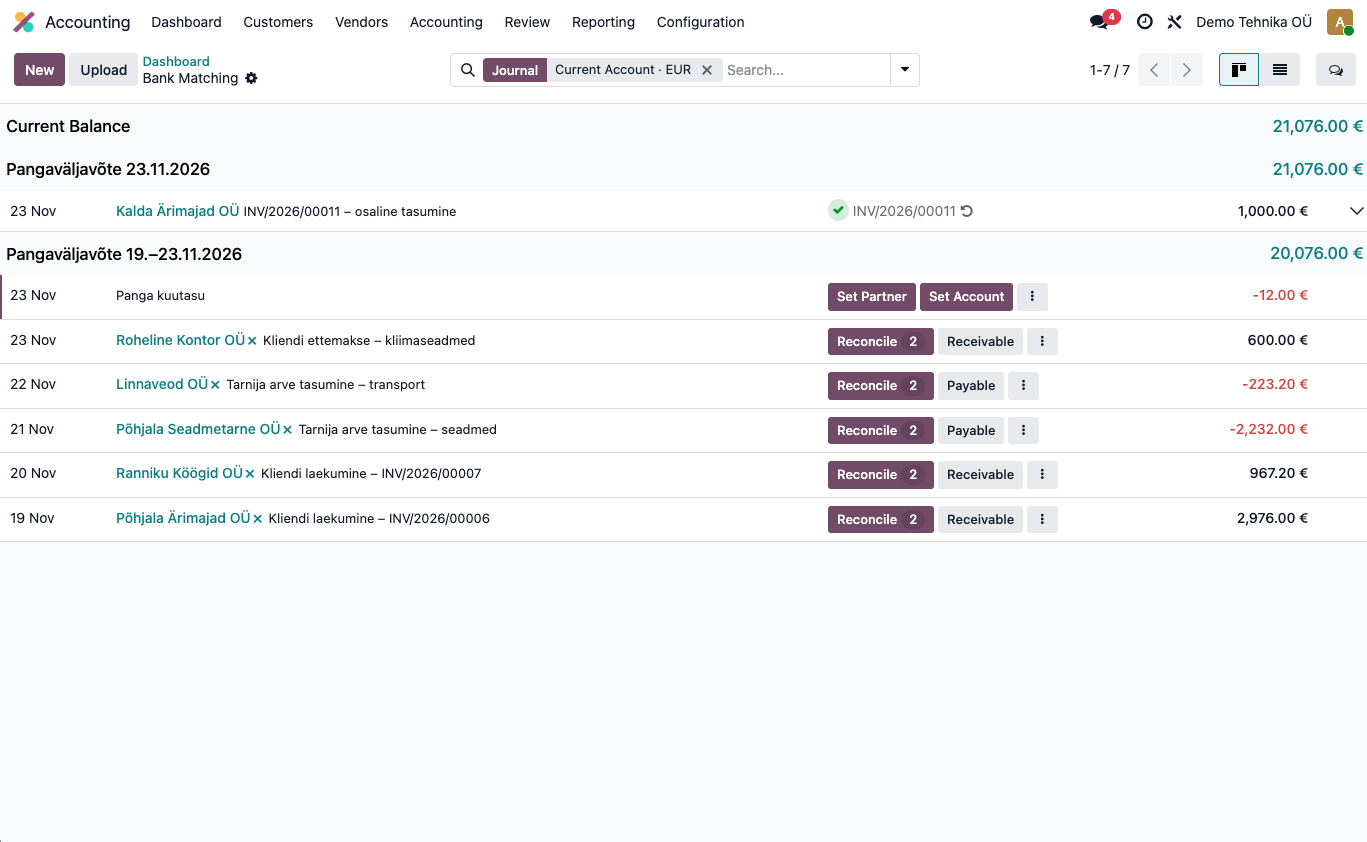
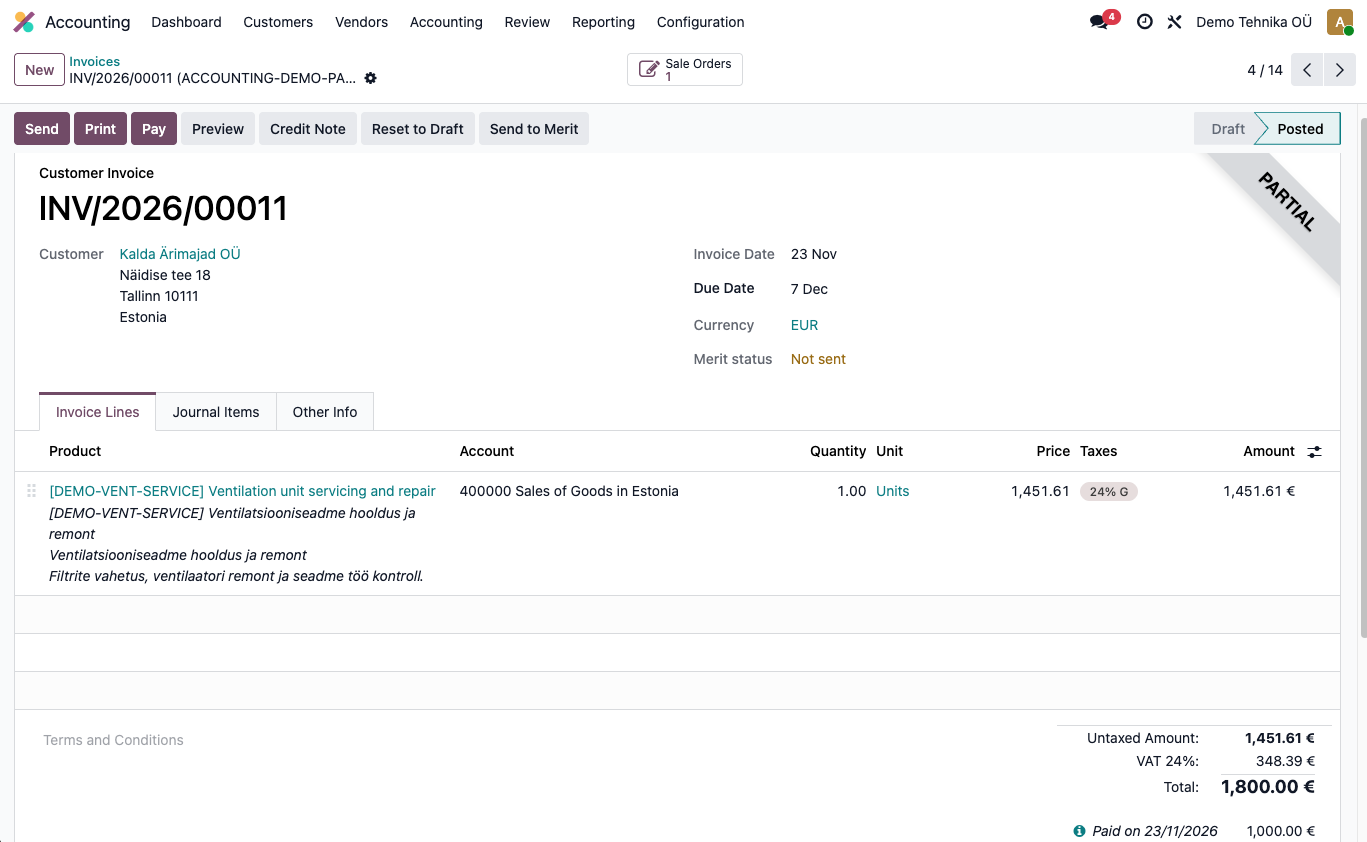
A customer pays €1,000 towards an €1,800 invoice. The accountant can see where the payment belongs and the salesperson can see what the customer still owes.
1
The salesperson creates the invoice
The salesperson creates an €1,800 invoice from the confirmed order and sends it to the customer.
2
The customer makes a part payment
A payment of €1,000 arrives in the bank account with the invoice number as its reference.
3
The accountant matches the payment
The accountant uses the invoice number in the payment reference to match the €1,000 receipt to the correct invoice.
4
The salesperson checks the outstanding balance
Before sending a reminder, the salesperson checks the invoice and sees that €800 is still due.
Matching a bank payment to an invoice
The invoice as the salesperson sees it
How does Odoo support accountants in Estonia?
In Odoo, you can review invoices and bank transactions throughout the month. At month end, the same accounting entries form the basis for your financial reports and VAT return.
Estonian chart of accounts and financial reports
Odoo’s Estonian chart of accounts and tax settings provide a starting point for your accounts. From the balance sheet or profit and loss report, you can open the underlying entries to see how each figure is calculated.
Estonian VAT return and KMD INF annex
In Odoo Enterprise, you can prepare the Estonian VAT return and its KMD INF annex. After reviewing the figures, you export the XML file from Odoo and manually upload it to e-MTA.
Sending and receiving e-invoices
With Esrap’s Billberry module, you can send customer invoices and receive supplier bills in Odoo. You can also use Odoo to exchange e-invoices with customers and suppliers on the international Peppol network. Your accountant can review and confirm incoming bills in Odoo.
Bank transactions directly in Odoo
Connect your business bank account to Odoo Enterprise to import incoming and outgoing payments automatically. Depending on your bank and provider, the connection may be included in your subscription or carry an additional fee. We can check which options are available for your account.
How do sales, purchases and stock feed into accounting?
When sales, inventory and accounting share the same Odoo system, your teams only need to enter the details once. Your accountant can check an invoice against the order and delivery, and trace a payment back to the original sale.
Sales and project work
The agreed prices carry over from the sales order to the invoice. For hourly services, you can invoice time recorded against tasks.
Purchasing and inventory
If you ordered ten units and received eight, you can check the supplier bill before posting it. Your stock valuation method also determines how inventory value and the cost of goods sold are reflected in the accounts.
Point of sale and online shop
Your accountant can compare till and online shop sales with the amount received in the bank account. If the payment provider has deducted a fee from the payout or a customer has received a refund, your accountant can see what accounts for the difference.
Pricing
Choose how much help you need to set up Odoo Enterprise Accounting for your business. Esrap sets up Odoo and guides your accountant, who checks the opening balances, confirms the accounting policies and continues to handle the day-to-day accounting.
Self-managed implementation
€500 one-off + VAT
€45 / month + VAT
€22.90 / user / month + VAT
€27.90 *
Basic accounting setup for one company, including two hours of one-to-one advice for your accountant.
Order accounting setupIncluded in the setup fee
- We set up your company details, the standard Estonian chart of accounts, taxes, and sales and purchase journals.
- Includes the Billberry integration for sending and receiving e-invoices in Odoo.
- We help your accountant issue a sales invoice, enter a supplier bill and match a customer payment to its invoice.
- You can use the two hours at handover or save some time for questions after trying Odoo yourself.
Esrap-led implementation
Price on request
€45 / month + VAT
€22.90 / user / month + VAT
€27.90 *
Before we start, we agree the scope, deliverables and implementation price.
Discuss your implementation- We review how you handle sales, purchases, banking and the month-end close.
- We configure the agreed accounts, taxes and workflows and help bring across opening balances and outstanding invoices.
- We reconcile opening balances to your previous system and check the first month’s reports with your accountant.
* With annual billing, the licence costs €22.90 per user per month for the first 12 months, then €27.90 per user per month at the standard rate. Prices exclude VAT.
You can start with accounting on its own or add it to your existing Odoo Enterprise sales, point of sale or online shop setup. If Esrap already hosts that environment, your current hosting fee stays the same.
Odoo Community supports invoicing. The full Accounting app is included in Odoo Enterprise. If you keep your accounts in Merit Aktiva, you can send sales invoices from Odoo using Esrap’s Merit Aktiva connector.
We quote separately for importing your existing chart of accounts or opening balances, setting up inventory and moving from Community to Enterprise. During implementation, we review your requirements for multi-company accounting, foreign currencies and consolidated reporting.
Discuss your accounting setupFrequently asked questions
Basic setup suits an accountant who wants to explore Odoo independently and start with the standard Estonian chart of accounts. The €500 fee plus VAT covers setup for one company and two hours of advice. You can use that time to work through your first invoices and customer payments or save some for questions that come up later.
Choose an Esrap-led implementation if you would also like help moving from your current accounting software. For example, we can transfer opening balances and outstanding invoices and review the first month’s reports with your accountant. We agree the scope and price before work starts.
If you want to create and send sales invoices in Odoo while your accountant keeps the books in another system, Odoo Community is sufficient for invoicing.
Choose Enterprise if you want to keep your company’s accounts in Odoo. Your accountant can match bank transactions to invoices, track receivables and payables, and prepare the balance sheet and profit and loss report in the same system. The Estonian reporting module also lets you prepare the VAT return and its KMD INF annex.
Yes. The simplest time to start using Odoo is the first day of a new month, once your accountant has closed the previous month in your current system.
During the switch, the opening balances are checked against your existing accounts and outstanding customer invoices and supplier bills are transferred. This lets you match later receipts and supplier payments to the correct invoices. If you would like Esrap to help transfer and check the data, we agree the scope separately.
You can transfer customers and suppliers, opening account balances, outstanding customer invoices and unpaid supplier bills. We start with Odoo’s Estonian chart of accounts. If you want to keep your familiar account codes and names, we work with your accountant to adapt the existing accounts and add any you need.
We can quote for the import once we have seen a sample export from your current software. You can keep transactions from previous years in your existing system or an archive. If you need that transaction history in Odoo, we quote for it separately.
You can bring bank transactions into Odoo through a bank connection or by importing a bank statement file. We help you check which connection supports your bank and whether it carries an additional fee.
You can send e-invoices to customers and receive them from suppliers in Odoo using Esrap’s Billberry integration or the Peppol network. We help you choose a channel based on how your customers and suppliers exchange e-invoices.
Esrap sets up Odoo and shows your accountant how to carry out everyday tasks. If you need help transferring data, we agree the scope of that work separately.
Your accountant decides which accounts and tax rules your company uses. Before the switch, they check the opening balances and compare the reports in Odoo with the figures in your current system.
Yes. You can issue sales invoices in Odoo and agree how your accountant receives them. If you use Merit Aktiva, Esrap offers an optional connector for sending sales invoices.
The accounting dashboard shows the number of overdue customer invoices and the total amount still outstanding on them. In the Aged Receivable report, you can see which invoices are overdue for each customer and how much is still owed on each one.
For example, if you match a €1,000 payment to a €1,800 invoice, €800 remains outstanding. Once the due date has passed, you can send the customer a reminder from Odoo for the remaining amount.
If the purchase order and the goods receipt are recorded in Odoo, you can check the unit price on the bill against the agreed price and the quantity billed against the quantity received before confirming the bill.
For example, if you ordered ten units and eight arrived, Odoo can prepare a draft bill for the eight received. If the supplier bills you for all ten, you can check whether the other two are still on their way or whether the bill needs correcting before you confirm it.
Yes. With Odoo’s analytic accounting, you can assign each line on a customer invoice or supplier bill to the project or department it relates to. For example, you can see the sales revenue from a client project alongside its material and subcontracting costs.
If several departments share a cost, you can split it between them. For example, you can divide office rent between the sales and service departments according to how much floor space each uses.