Customer relationship management and sales quotations in Odoo
See which enquiries need a reply, who has received a quotation and who to follow up with today. Prepare the quotation in Odoo. Once the customer accepts it, use the sales order to arrange delivery and raise an invoice.
See how it works Talk to a specialist
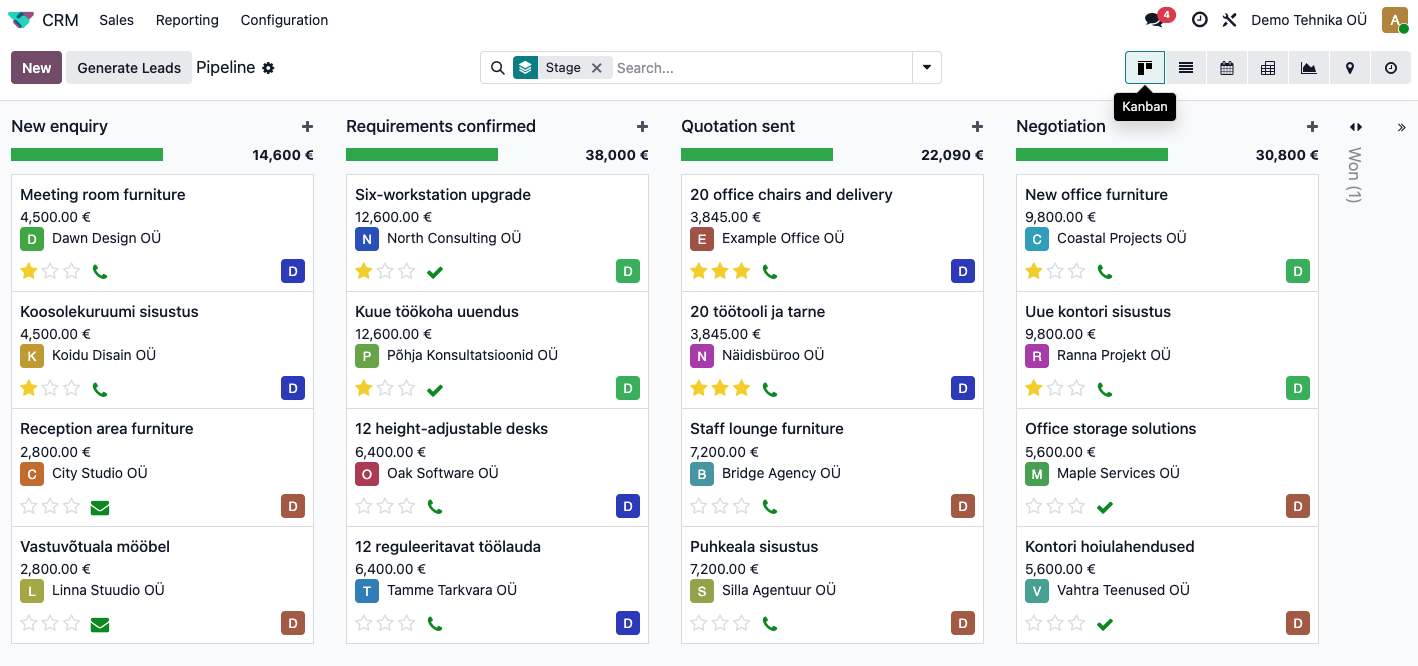
Stay on top of day-to-day sales
Sales reps can see who to call today and which quotations are awaiting a reply. Sales managers can use the same information to see which deals are likely to close this month.
See what was agreed
Before calling, check what you promised the customer and which quotation they received.
See who owns each enquiry
Check who is handling the enquiry and how far the opportunity has progressed.
Follow up on time
Schedule your next call so you know who to contact at the start of the day.
See this month’s forecast
See the value of deals expected to close this month. Compare forecasts across your team.
How does an enquiry become an order?
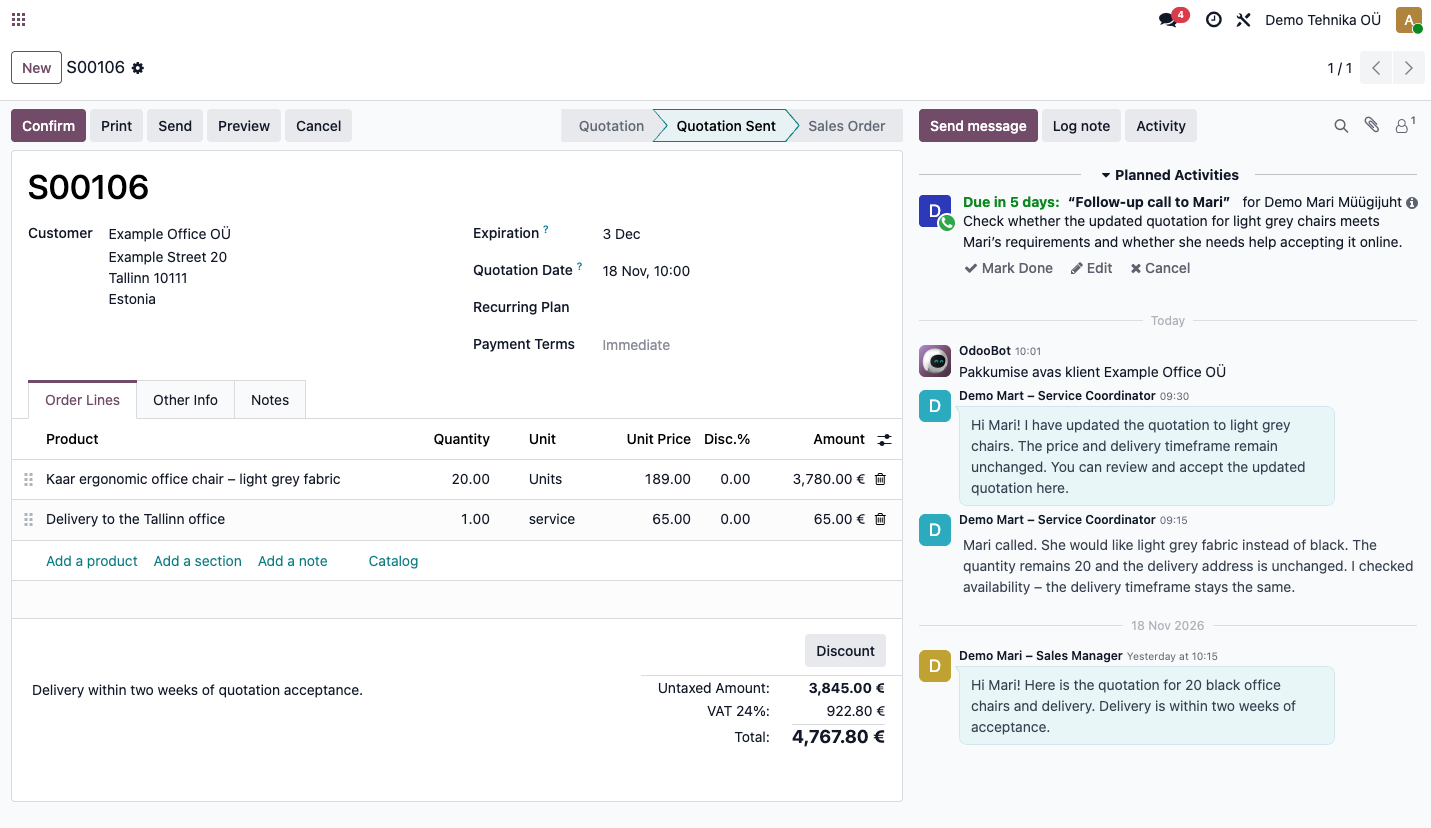
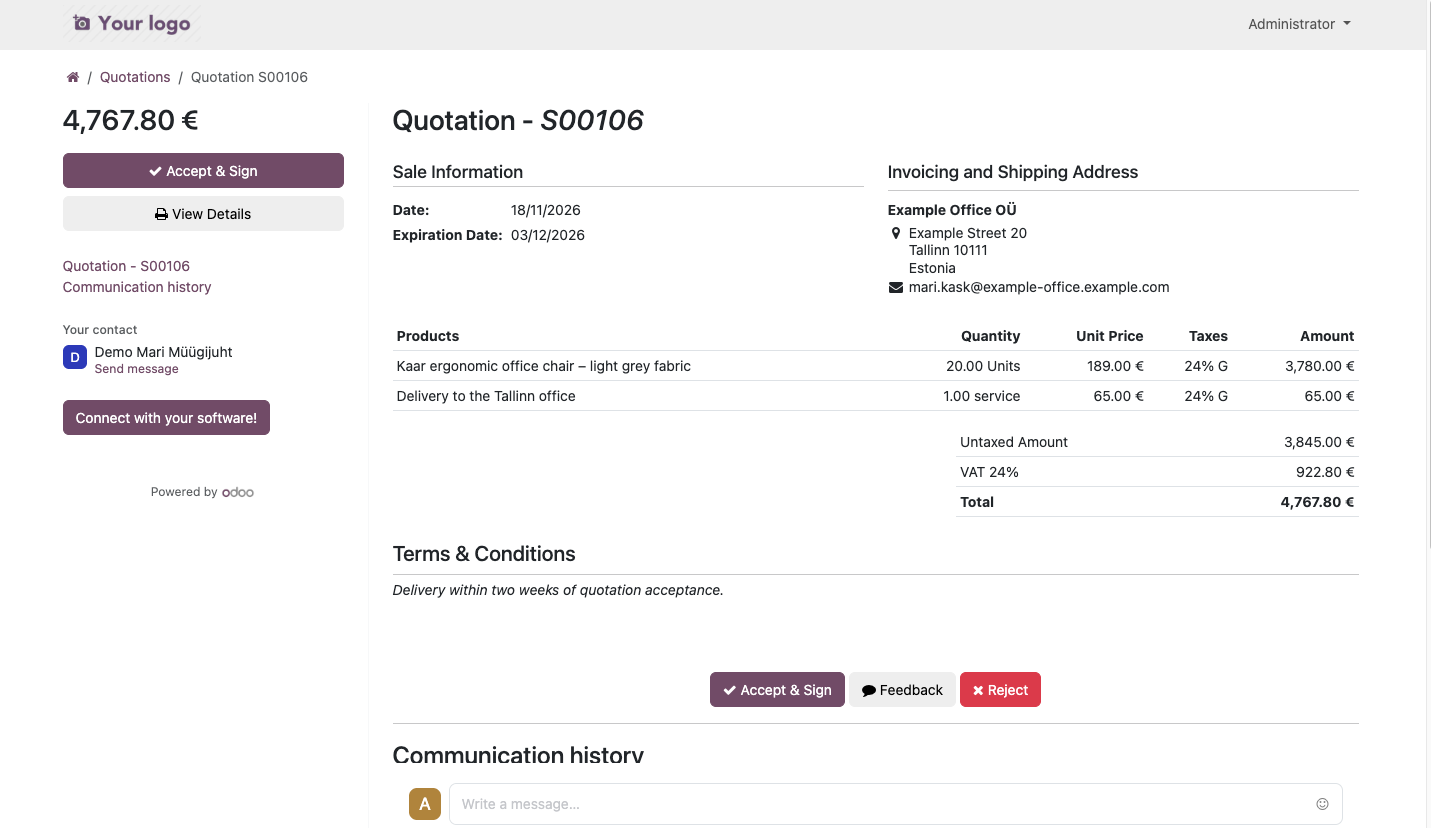
The sales rep checks what the customer needs and sends a quotation. Colleagues can see any changes, and the customer can accept the final quotation online.
1
The enquiry comes in
A customer submits an enquiry through a web form. The sales rep sees the quantity and delivery date requested in Odoo and checks whether the chairs are available.
2
The rep sends a quotation
The rep adds the chairs and delivery to the quotation, sends the customer a link and schedules a follow-up call for Tuesday.
3
The customer requests a change
The customer calls to ask for the chairs in a different colour. The colleague who takes the call can see the original quotation and update it.
4
The customer confirms the order
The customer reviews and accepts the revised quotation online. The sales rep receives a notification and the warehouse can prepare the order for delivery.
The sales rep’s view
The customer’s view
What happens once a quotation is accepted?
When the customer accepts a quotation, it becomes a sales order in Odoo. The order records the agreed products, services and prices, giving the team the details they need to arrange delivery, plan the work and raise an invoice.
When selling goods
Use the order to arrange picking and delivery. The sales rep and the warehouse team can both see exactly what the customer ordered.
When selling services
You can configure a service to create a project or task when it is sold. The person doing the work can see what was promised to the customer.
When invoicing
Raise an invoice from the sales order. If you use Merit Aktiva, Esrap offers an optional integration for transferring sales invoices.
Why choose Esrap for Odoo CRM?
Choose how much help you need, where to host Odoo and how to develop it as your business grows.
A flexible way to get started
With the Standard package, we install Odoo and complete the basic setup. You can take it from there using Odoo’s guides and video tutorials. If you need help with a specific task, we offer support at an hourly rate. If you would like Esrap to manage the implementation, we agree the scope and price with you before work starts.
Choose where to host Odoo
We host your Odoo environment on Hetzner servers. Your company owns its data, and you can move Odoo to another hosting provider. If you prefer to use your own server, we can install it there.
Built for businesses in Estonia
The Standard package includes Esrap’s integration with the Estonian e-Business Register, email enhancements and improvements to Odoo’s Estonian translations. You can populate a business customer’s contact record directly from the register. Optional integrations are available for Merit Aktiva and Billberry e-invoicing.
A local implementation and development partner
You can discuss your sales process with an Esrap specialist in Estonian. Together, we work out what can be configured in Odoo and where development is needed. If several Estonian businesses need the same feature, we consider adding it to an Esrap module.
Pricing
With Odoo Community, you can add people to your sales team without paying a licence fee per user. If you need Enterprise apps or support from Odoo, a per-user licence fee applies.
Standard
€500 one-off + VAT
€45 / month + VAT
Esrap installs Odoo and completes the basic setup. You can then configure your sales stages, import contacts and connect your company email yourself. Esrap can help with these tasks or train your team at an hourly rate.
Enquire about the Standard package- Odoo Community installation and basic setup
- Esrap’s e-Business Register integration
- Esrap’s email enhancements
Managed implementation
Price on request
€45 / month + VAT
The Standard package plus an implementation project tailored to your business.
Discuss your implementation- Everything in the Standard package
- Requirements review and workflow configuration
- Customisation of email notifications, quotations and invoices
- Data migration, integrations and custom development within the agreed scope
Standard
€500 one-off + VAT
€45 / month + VAT
€22.90 / user / month + VAT
€27.90 *
Esrap installs Odoo and completes the basic setup. You can then configure your sales stages, import contacts and connect your company email yourself. Esrap can help with these tasks or train your team at an hourly rate.
Enquire about the Standard package- Odoo Enterprise installation and basic setup
- Esrap’s e-Business Register integration
- Esrap’s email enhancements
Managed implementation
Price on request
€45 / month + VAT
€22.90 / user / month + VAT
€27.90 *
The Standard package plus an implementation project tailored to your business.
Discuss your implementation- Everything in the Standard package
- Requirements review and workflow configuration
- Customisation of email notifications, quotations and invoices
- Data migration, integrations and custom development within the agreed scope
* With annual billing, the licence costs €22.90 per user per month for the first 12 months, then €27.90 per user per month at the standard rate. Prices exclude VAT.
The Enterprise licence includes apps such as Odoo Accounting, Subscriptions and Field Service. View licence pricing
Where should your business start? Bring us a typical customer enquiry and a sample quotation, and we’ll show you how your team could handle that sale in Odoo.
Discuss your sales processFrequently asked questions
Yes. You can use Odoo’s contact import tool to bring in companies and individual contacts from an Excel or CSV file. If your data is in another CRM, export it to a file first. In Odoo, match each column to the relevant field, such as company name, contact name, email address or phone number. You can check how Odoo reads the file before importing it.
If you would like help preparing the file or would prefer Esrap to run the import, send us a sample. Importing customers and contacts from a well-organised spreadsheet generally takes about an hour. If the data needs cleaning or combining from several files, we agree the scope and price with you first.
Yes. You can customise the design and layout of PDF quotations in Odoo. You can set the logo, colours, fonts and footer details yourself and add your payment and delivery terms to the quotation template.
You can also include a separate cover page, a company introduction or a description of the proposed solution. We recommend working with Esrap on more substantial changes, particularly if you want to redesign the whole document or rearrange the product table.
Yes. You can create price lists for individual customers or groups. For example, a reseller might have its own price list, while a business customer might have an agreed price for a particular product. When you select the customer on a quotation, Odoo uses their assigned price list.
You can also set quantity discounts. For instance, one office chair might cost €210, dropping to €189 per chair on orders of 20 or more. Odoo applies the agreed price to the quotation automatically.
Filter the quotation list to show quotations you have sent that customers have yet to accept. To see just your own quotations, select your name in the filter.
If a customer expects to reply next week, you can schedule a follow-up call for Tuesday on the quotation. Your activities show which customers to contact today and which calls are overdue.
Yes. You can connect your company’s existing mailbox to Odoo, including Gmail in Google Workspace or a Microsoft 365 mailbox you use with Outlook. Email the customer directly from an opportunity or quotation in Odoo. Their reply appears in the same thread, so colleagues can see what has already been agreed.
You can give each sales team a dedicated email address, or alias, for new enquiries. For example, an email sent to sales@example.com can automatically create a new opportunity. Each sales team can have its own address.
You can sync your Google or Microsoft 365 calendar with Odoo so that customer meetings booked in Odoo appear in your usual calendar. The Standard package includes Esrap’s email enhancements. Your quotation will set out the work needed to connect your mailbox and calendar, along with any additional services.
Installation and basic setup with the Standard package cost €500 + VAT as a one-off fee. Hosting costs €45 + VAT per month per company. Odoo Community has no per-user licence fee. For example, a team of three pays €45 + VAT per month in total, and adding a fourth user costs no extra.
With Odoo Enterprise, a per-user licence fee applies in addition to hosting. With annual billing, the rate for the first 12 months starts at €22.90 + VAT per user per month. If you would like Esrap to manage the whole implementation, we agree the scope and price with you before work starts. Compare package prices and features
Odoo Community is a good fit if you want to manage customer enquiries, plan follow-ups, prepare quotations and create sales orders. Adding users does not incur an Odoo licence fee.
Odoo Enterprise is worth considering if you need an Enterprise app or support from Odoo. For example, your sales team may need to manage subscriptions, your technicians may need to schedule field service visits, or your accountant may need Odoo Accounting. Enterprise licences are priced per user.
Esrap offers implementation support, integrations and custom development for both editions. Compare Community and Enterprise on Odoo’s website →
Yes. You can start by bringing customer contacts together in Odoo, tracking open opportunities and planning your next calls or meetings.
When you are ready to prepare quotations in Odoo, you can use your existing customer records and create a quotation directly from an opportunity. Later, you can add inventory management or invoicing to arrange delivery or raise an invoice from a confirmed sales order.
Create user accounts and, if needed, sales teams. Add your customers and connect your company email to Odoo. Agree your sales stages with the team and add your open opportunities to the pipeline. Assign each one an owner and a next action.
If you plan to send quotations from Odoo, add your products or services, prices and sales terms. You can do this yourself or work through it with Esrap.
Record the expected value of each opportunity and the date when you expect the customer to decide. The Odoo sales forecast shows which deals you expect to close this month or next and their total value. You can view the forecast for an individual sales rep or the whole team.
For example, in a sales meeting you can open the larger deals expected to close this month and review what has been agreed with each customer. If a customer postpones a decision until next month, update the expected closing date and schedule the next call. This keeps the forecast in line with the team’s latest information.