
How does the Odoo and Merit Aktiva integration work?
From Odoo to Merit, you can send customer and product data, sales orders, sales invoices, credit notes and payments. This includes transactions from Odoo eCommerce and Point of Sale.
From Merit to Odoo, you can bring across stock levels, invoice numbers and payment statuses, and import existing customers and products.
Data can be transferred automatically or manually, depending on the type of data and how the integration is configured. For example, stock levels are updated every 15 minutes, and invoice payment statuses are updated hourly.
You can choose which data the systems exchange and where to manage invoices and product records. Stock control remains in Merit Aktiva.
Invoicing in Odoo or Merit Aktiva
The integration supports two invoicing workflows. The choice depends on whether you want to create sales invoices in Odoo or leave invoicing to your accountant.
Invoicing in Merit Aktiva
In this workflow, you create quotations and sales orders in Odoo. Confirmed order details are sent to Merit, where your accountant can use them to create and issue the invoice.
The invoice number and payment status from Merit are sent back to the Odoo sales order. The sales team can see from the order whether the invoice has been issued and paid.
This workflow can be useful if an external accountancy firm handles your invoicing.
Invoicing in Odoo
Alternatively, you can manage the entire sales process in Odoo, from the initial quotation to issuing the invoice.
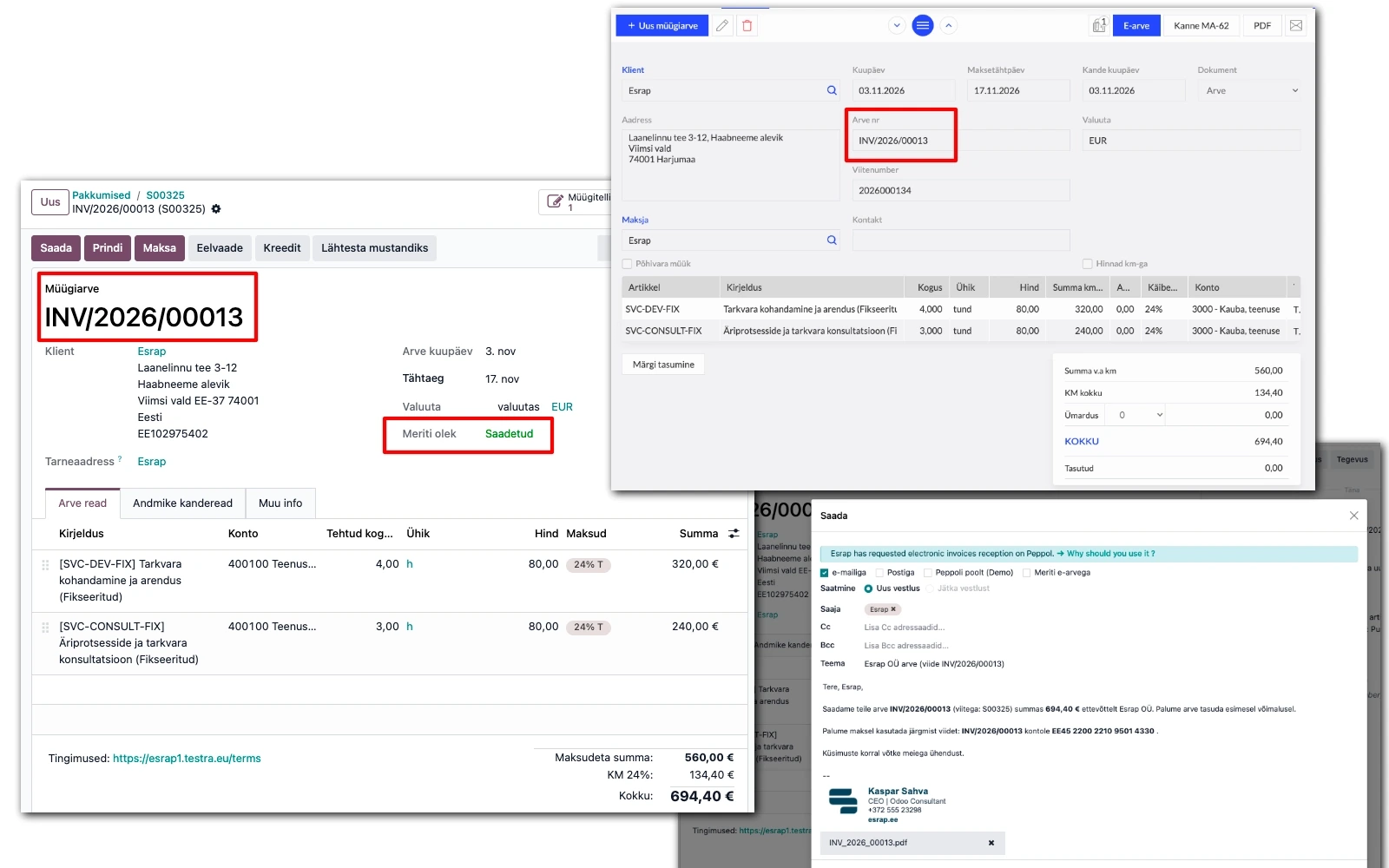
Once confirmed, the sales invoice is sent to Merit Aktiva automatically with its invoice number and PDF. You can also send payments, credit notes and details of how those credit notes were applied.
If your business uses Merit Aktiva to issue e-invoices, you can send an invoice created in Odoo as an e-invoice through Merit.
This workflow suits businesses that want to manage sales orders and invoices in one system while keeping their accounting in Merit Aktiva.
B2B sales: from quotation to invoice
In Odoo, you can manage B2B sales from the initial customer enquiry and quotation through to order fulfilment and invoicing.
Confirmed sales orders or invoices are sent to Merit with the required details: customer, products or services, quantities, prices, discounts and taxes.
You can also include additional invoicing details, such as the customer’s contact person or the procurement contract number. The latter is particularly useful when invoicing public bodies and larger organisations.
A wholesaler, for example, can prepare quotations, record orders and arrange deliveries in Odoo. The accountant receives the order details in Merit without re-entering them, and stock control stays in Merit.
Odoo eCommerce and Merit Aktiva
Orders and payments from your Odoo online shop can be sent automatically to Merit Aktiva.
When a customer places an order online and pays by bank link or card, the corresponding invoice and payment details can be sent to Merit. Depending on the invoicing workflow, the invoice is created in either Odoo or Merit Aktiva.
The integration also supports partial payments, credit notes and recording refunds. For example, when goods are returned, you can send the corresponding credit note to Merit and record the money refunded to the customer.
Using Merit Aktiva stock levels in your online shop
Stock is managed in Merit Aktiva, and the Odoo online shop uses the stock quantities recorded there.
Stock levels are updated every 15 minutes. This is not real-time synchronisation, but it removes the need to enter and update stock quantities in both systems.
If you use Odoo POS alongside your online shop, the quantity available online also takes into account POS sales not yet sent to Merit. This reduces the risk of selling an item online after it has already been sold in store.
Sending Odoo POS sales to Merit
Odoo POS can be used in shops, cafés and other retail businesses. There are two ways to record POS sales in Merit Aktiva.
One summary invoice per POS session
When the POS session closes, Merit receives a single summary invoice covering sales and returns for that session.
This suits businesses that only need summary sales figures for accounting and do not need a separate invoice for every purchase.
A separate invoice for each POS transaction
Paid POS transactions are sent to Merit as individual invoices throughout the session.
This lets you see individual sales in Merit and record sales and changes in stock levels more frequently.
In either workflow, you can distinguish between payment methods, such as cash and card, and map them to the corresponding accounts in Merit.
You can also send POS returns and invoices issued to business customers at the till.
Managing products and stock levels
You can manage product records in either Odoo or Merit Aktiva. In both cases, stock control stays in Merit.
If you manage products in Odoo, you can send them to Merit Aktiva as sales items.
If you manage products in Merit, you can import those items into Odoo and keep them up to date automatically.
New products imported from Merit are initially unpublished in Odoo. This lets you add descriptions, images and other information before making them available in your online shop.
Stock levels recorded in Merit are sent to Odoo for use in the online shop and when creating sales orders.
For example, a business may sell the same products to B2B customers, through an Odoo online shop and in a physical shop. Transactions from all sales channels go to Merit, where stock is tracked.
Configuring and monitoring data transfers
Before enabling automatic transfers, you can choose which data to exchange between the two systems.
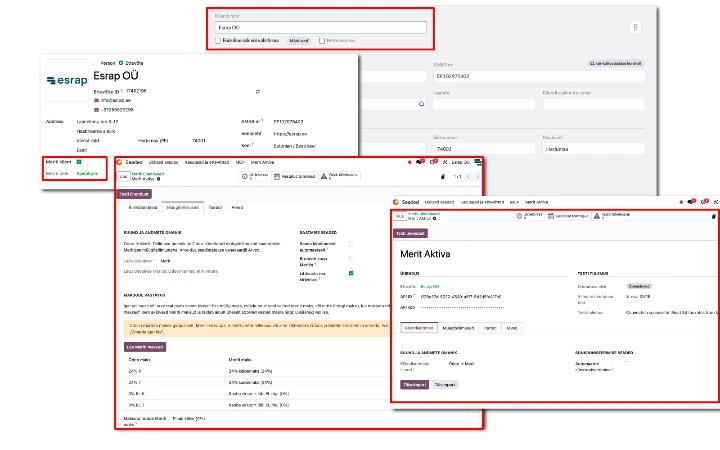
Installing the module does not immediately start sending documents automatically. First, set up the connection, choose an invoicing workflow and configure the mappings for taxes, warehouses, products and payment methods.
When transferring customer and product records for the first time, you can preview and select the records to send.
The integration checks for previously transferred documents to avoid creating duplicates. If a transfer fails, it shows which records need attention and explains what went wrong.
Getting started with the Odoo and Merit Aktiva integration
Esrap’s integration supports Odoo 19 Community and Enterprise and requires access to the Merit Aktiva API.
Before you start, agree where invoices will be created, which system will hold the main product records and which sales channels you want to connect to Merit. Accounting and stock control remain in Merit Aktiva.
You can also introduce Odoo in stages. For example, you can start by managing B2B sales orders and add an online shop or POS later without replacing your existing accounting software.
Explore the Odoo and Merit Aktiva integration or email info@esrap.ee to discuss whether it fits the way your business works.