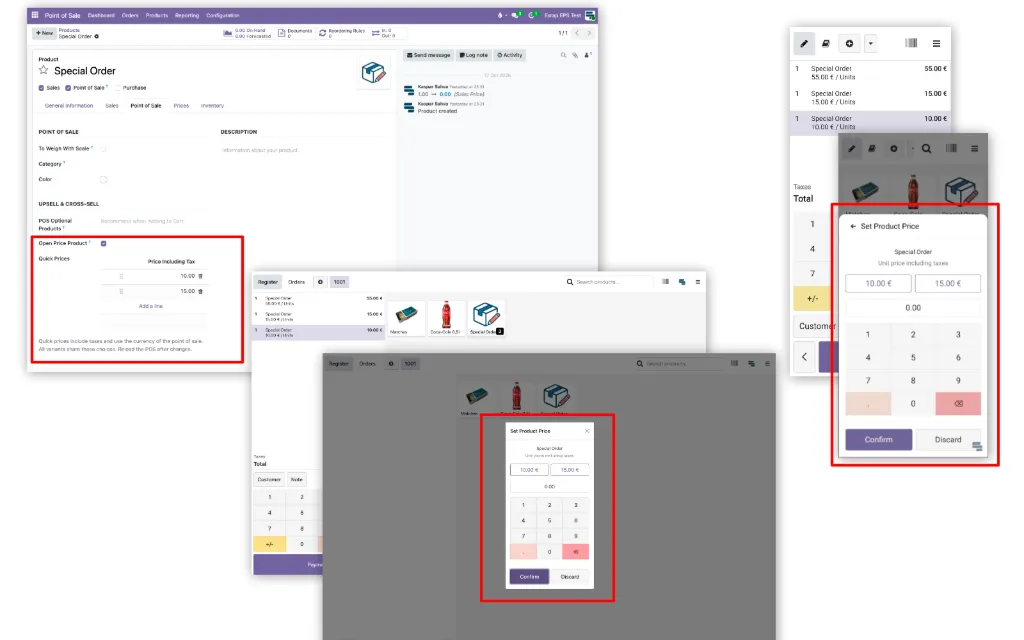
Odoo POS Open Price lets the cashier set a tax-inclusive unit price whenever an open-price product is added to the POS. The price can be selected from product-specific quick choices or entered manually.
The add-on is designed for products and services with variable prices where creating a separate product for every price point would be impractical. The entered price remains part of the standard Odoo order line, tax calculation, discount and refund workflows.
What the module does
- adds an Open Price Product option and ordered quick-price choices to the product
- opens the price selector every time an open-price product is added to the POS
- uses the active pricelist's tax-inclusive unit price as the initial value
- allows the cashier to select a quick price or enter an amount manually
- accepts a zero price but rejects negative prices
- adds no order line when cancelled and keeps each addition on a separate line
- retains the manually entered unit price when the quantity changes
- uses standard Odoo tax, fiscal position, discount and refund workflows.
Best fit
Shops and service locations where the same product or service is sold at different prices and the cashier needs to select or enter the price quickly at the point of sale.
Technical information
- Odoo add-on technical name: esrap_pos_open_price
- required Odoo module: point_of_sale
- licence: OPL-1
- price: free.