
When payment, delivery and settlement are handled in different systems
An online shop payment may take the customer only a few moments, but for the business it is merely the beginning of handling the order. The order needs the correct delivery method, the receipt needs to be checked and service fees need to be recorded. Where required, the same payment logic must also work at a physical sales location. When payment, delivery and settlement are handled in different systems, increasing transaction volumes bring more manual checking and comparison, as well as a greater risk of errors.
The typical problem is not that any individual system fails to work. The online shop accepts the order, the payment service processes the payment, the carrier delivers the parcel and the till records the sale. Complexity arises when information moves from one system to another. The payment must be connected to the correct order, the customer's delivery choice must reach the warehouse, and online shop and POS transactions, including service fees, must remain clearly distinguishable in accounting.
The problem usually does not arise from one major error, but from many small transfers and checks.
A discrepancy in one place can affect several subsequent stages. An incorrect payment status makes the order harder to process, a missing delivery choice disrupts warehouse work, and an inaccurate settlement line makes accounting checks more difficult. Finding the cause of these errors and correcting them properly can be complex and time-consuming. During a busy sales period, errors can accumulate until a system intended to support the business instead creates extra checks, delays and manual work.
The purpose of integrating MakeCommerce and Odoo is to connect these points into a controlled process. This does not mean that every step must take place without human involvement. A good solution automates defined data movements and retains control where the business genuinely needs it.
Two comprehensive solutions in one process
Odoo's greatest value for a merchant is that the online shop, POS, sales, purchasing, inventory and accounting can work in one system. All these processes use the same product, customer, price and stock data. This reduces the need to keep the same data in several applications, enter it repeatedly or synchronise it through separate integrations.
Odoo may be used by a business solely as an online shop or POS solution, but inventory, purchasing, sales, accounting and other business processes can be added when needed. For example, a sales order or POS sale can change stock levels, provide input for replenishment and reach accounting within the same system. The exact process depends on the business's needs and Odoo configuration.
MakeCommerce brings online payments, card payments at physical sales locations and delivery services under one partner and integration. A merchant can offer different bank and card payments, digital wallets and “pay later” solutions. Shipping+ connects the online shop to widely used parcel locker and courier services, while MakeCommerce POS enables contactless payments on a suitable Android device.
When Odoo and MakeCommerce are connected, payment and delivery no longer remain separate activities that must be checked independently. They are connected to the order, inventory and settlement within the same Odoo process. An online payment is linked to the Odoo order, the customer's delivery choice moves into the sales and inventory process, and the result of a SoftPOS payment initiated at the till returns to Odoo. MakeCommerce transaction and payout data can be brought into Odoo Accounting for checking and, after review, used to create and reconcile bank statement lines.
For the merchant, this means fewer places where the same information must be entered or checked later. The whole solution does not have to be adopted at once: the business can start with the area where the greatest amount of manual work or the most inaccuracies currently occur.
Four ready integrations that can be used separately or together
The same modular principle applies when connecting MakeCommerce and Odoo. Esrap's solution consists of four ready integrations, each connecting one defined part of MakeCommerce's services to Odoo. A business can adopt only the components it needs or combine them into a more complete process.
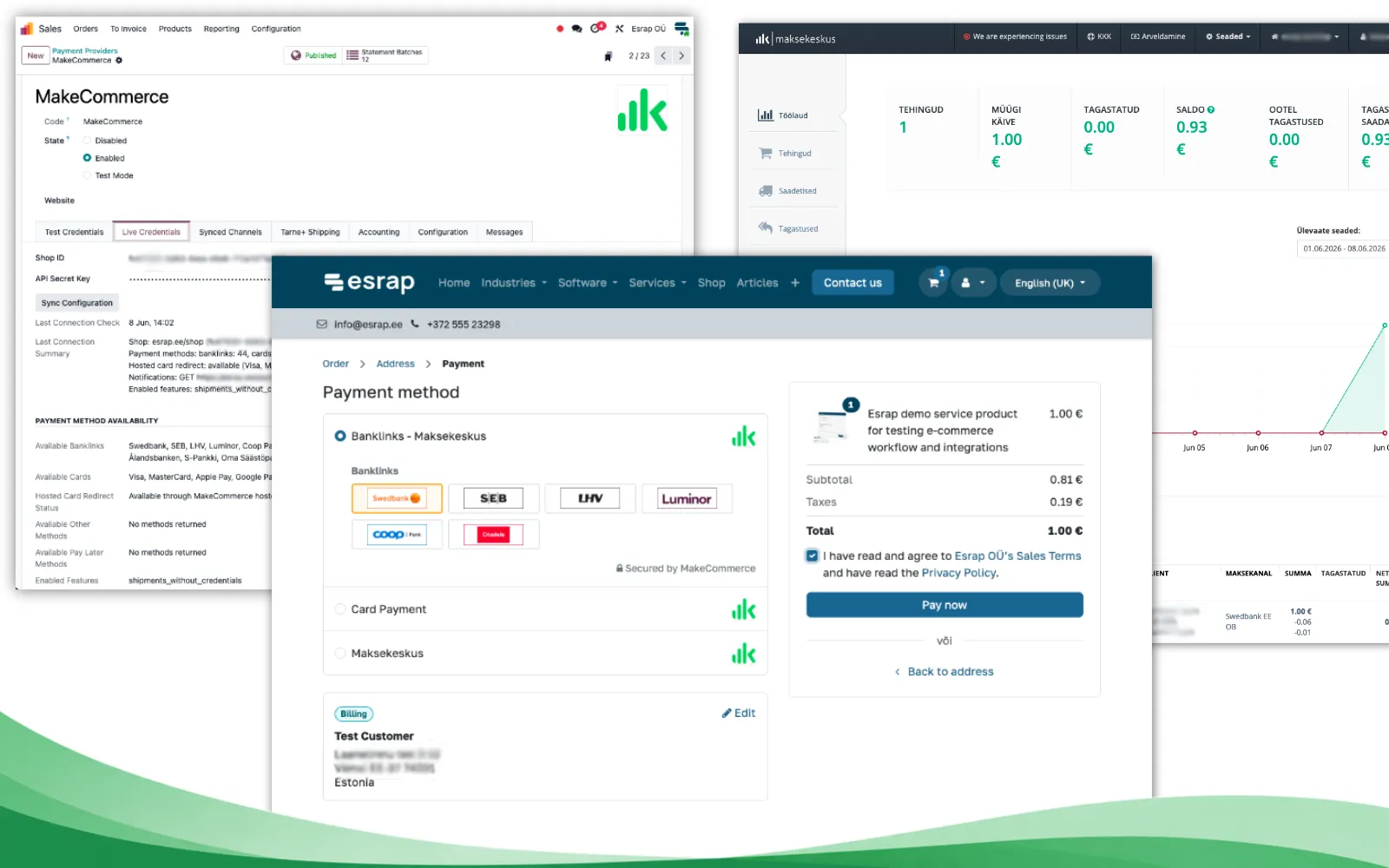
- Payment solution for Odoo enables payments in the Odoo online shop, customer portal and through payment links. The payment result remains linked in Odoo to the relevant order or other sales document.
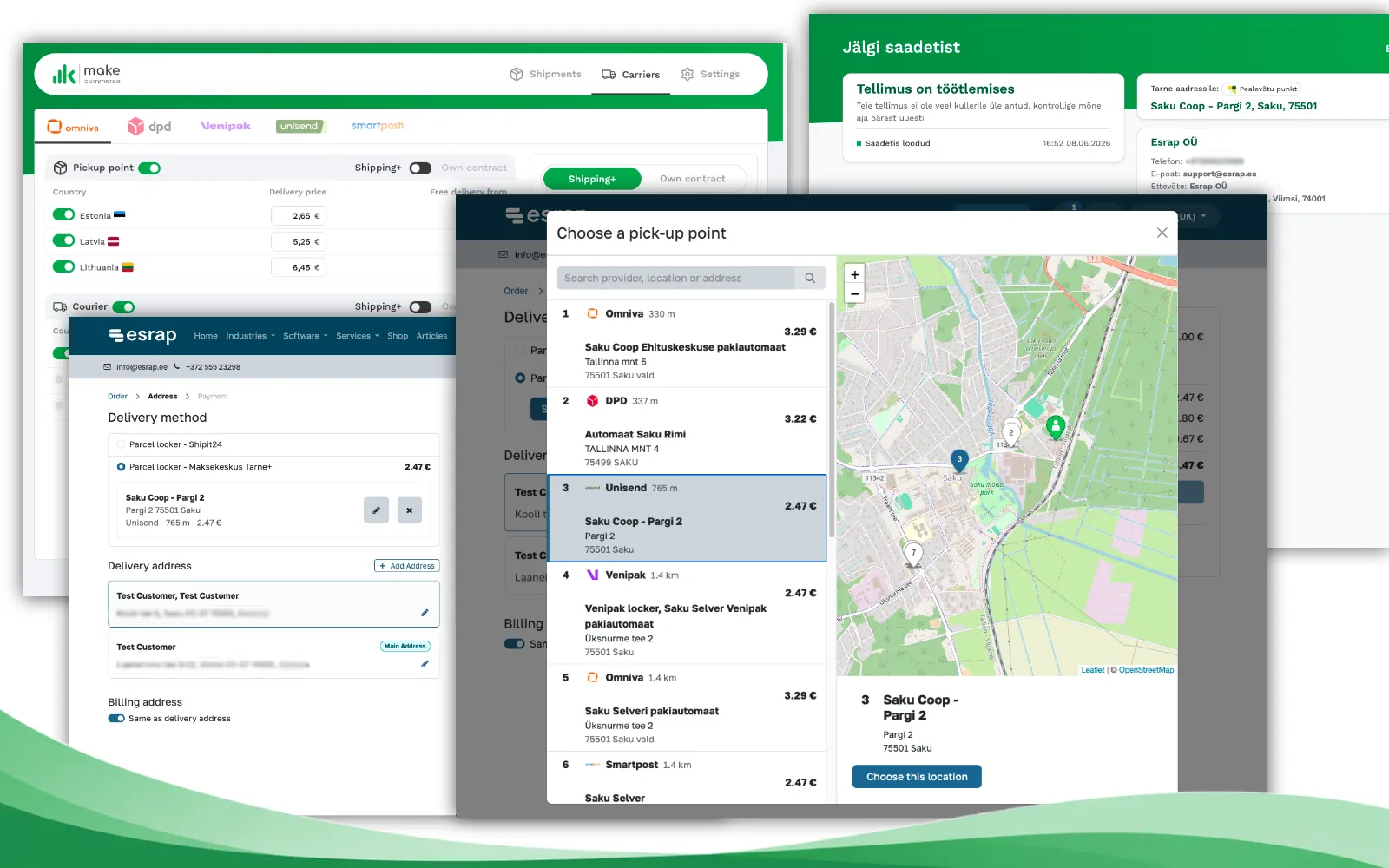
- Shipping+ delivery integration brings suitable delivery methods and parcel lockers into the Odoo online shop. The delivery information chosen by the customer is stored with the order and can be used in the subsequent sales and inventory process.
- MakeCommerce POS SoftPOS integration sends the amount of a payment initiated in Odoo POS to the payment application and returns the payment result to Odoo. This reduces the need to enter the same amount manually at both the till and in the payment application.
- MakeCommerce statement import brings transaction, payout and service fee data into the review view in Odoo Accounting. Imported lines are reviewed before bank statement lines are created, after which reconciliation continues through Odoo's standard accounting process.
The right combination depends on the business's sales channels, delivery arrangements and whether its accounting is managed in Odoo. With the core integrations already available, connections do not have to be designed from scratch. The first discussion can focus on how orders, payments, delivery and checks should actually move through the business.
One payment integration for the Odoo online shop, invoices and personalised payment links
The MakeCommerce payment solution for Odoo enables the same payment integration to be used in several sales situations. An online shop customer can pay during checkout, a customer portal user can pay alongside an order or invoice, and a payment link can also be used to request payment for a personalised quotation or an order placed by telephone or email. A separate payment process is therefore not required for every sales channel.
Odoo sends the payment amount, currency and transaction reference to MakeCommerce. The customer chooses a suitable payment method, and the confirmed payment result returns to the correct payment transaction and sales document in Odoo. In daily sales work, a successful payment does not have to be copied manually from MakeCommerce to Odoo, and the order or invoice can continue through the standard Odoo process.
Through one MakeCommerce connection, a merchant can offer bank payments in the Baltic countries and Finland, Visa and Mastercard card payments, Apple Pay, Google Pay and various “buy now, pay later” solutions. The exact selection depends on the payment methods activated on the merchant's MakeCommerce account. Card details are entered in the MakeCommerce payment environment and are not stored in Odoo. MakeCommerce complies with PCI DSS Level 1 requirements.
The payment result returned to Odoo supports the operational handling of the order or invoice, but it does not replace accounting checks. Actual receipts, payouts and service fees are checked later against the MakeCommerce statement and reconciled in Odoo Accounting.
From delivery choice to shipping label within the same Odoo process
Odoo connects an online shop order to the sales and inventory process. The customer's chosen delivery method, parcel locker and delivery charge remain linked to the same sales order and move to the delivery order created from it. Sales and warehouse teams work with the same information and do not need to copy the customer's delivery choice from emails or another system into the order.
The MakeCommerce Shipping+ integration adds delivery options from Omniva, SmartPost, DPD, Venipak and Unisend to the Odoo online shop. During Odoo checkout, the customer sees the available delivery methods and can choose a suitable carrier and specific parcel locker. The selected delivery information is stored on the Odoo sales order and delivery order, where the merchant continues the normal picking and dispatch process.
Shipping+ enables merchants to use the rates agreed by MakeCommerce with carriers and brings popular delivery methods under one service. If the business already has its own agreements with carriers, Shipping+ Pro can apply the terms of those agreements while shipments are managed in the same system.
Once the required Shipping+ access and configuration are in place, a shipment can be registered from the delivery order, a shipping label can be created and the delivery status can be tracked. At the same time, Odoo can define when different delivery methods are offered and combine Shipping+ options with, for example, collection from store.
The warehouse team therefore sees the same delivery information on the Odoo delivery order that the customer selected in the online shop. Parcel locker and other delivery details do not have to be copied manually into the order.
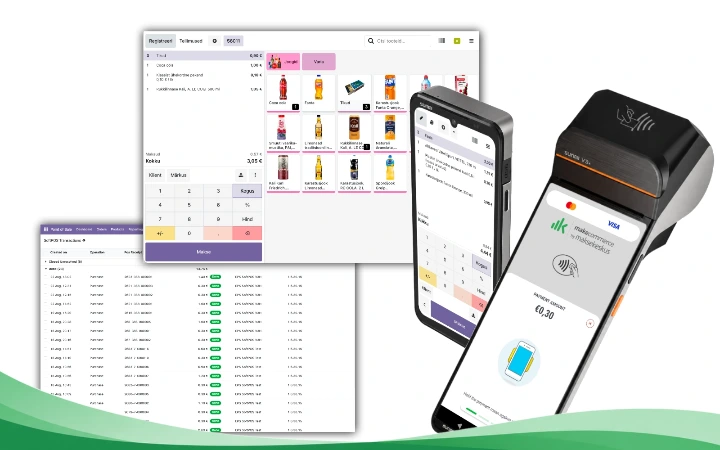
Odoo POS and SoftPOS on one device and in one payment flow
A sale recorded in Odoo POS immediately forms part of the business's shared sales and inventory process. The till uses the same products, prices, customer data and stock information as other Odoo applications. Sales do not have to be transferred later from a standalone POS system to inventory or business management software, and the same POS solution can be used across the business's different sales locations.
MakeCommerce POS turns a suitable NFC-enabled Android device into a means of accepting contactless payments. At a compact till or for mobile sales, the same device can serve as both the Odoo POS and payment terminal. This reduces the need for separate hardware and suits not only conventional sales locations but also pop-up shops, trade fairs, mobile sales and service at a customer's premises.
The cashier selects the SoftPOS payment method in Odoo POS, and Odoo sends the payment amount and transaction reference to the MakeCommerce POS application. The customer pays contactlessly, and the payment result returns to Odoo, where it is linked to the correct POS sale. The cashier does not have to enter the amount manually in the payment application, reducing the risk of an incorrect amount and duplicate work.
MakeCommerce POS accepts Visa and Mastercard contactless payments as well as Apple Pay and Google Pay payments made by phone or smartwatch. On a POS device with a supported printer, the payment receipt can be printed after the Odoo sales receipt, allowing the entire sale to be completed on one POS device.
Esrap supplies Android POS devices that have been checked and are supported for this integration, with Odoo POS and MakeCommerce POS working together on the same device. The devices offered are intended for professional daily POS and payment use and are selected with reliability, long-term use and future software updates in mind.
The payment result returned to Odoo confirms the payment made at the till. The transaction is checked later for accounting purposes against the MakeCommerce statement.
'
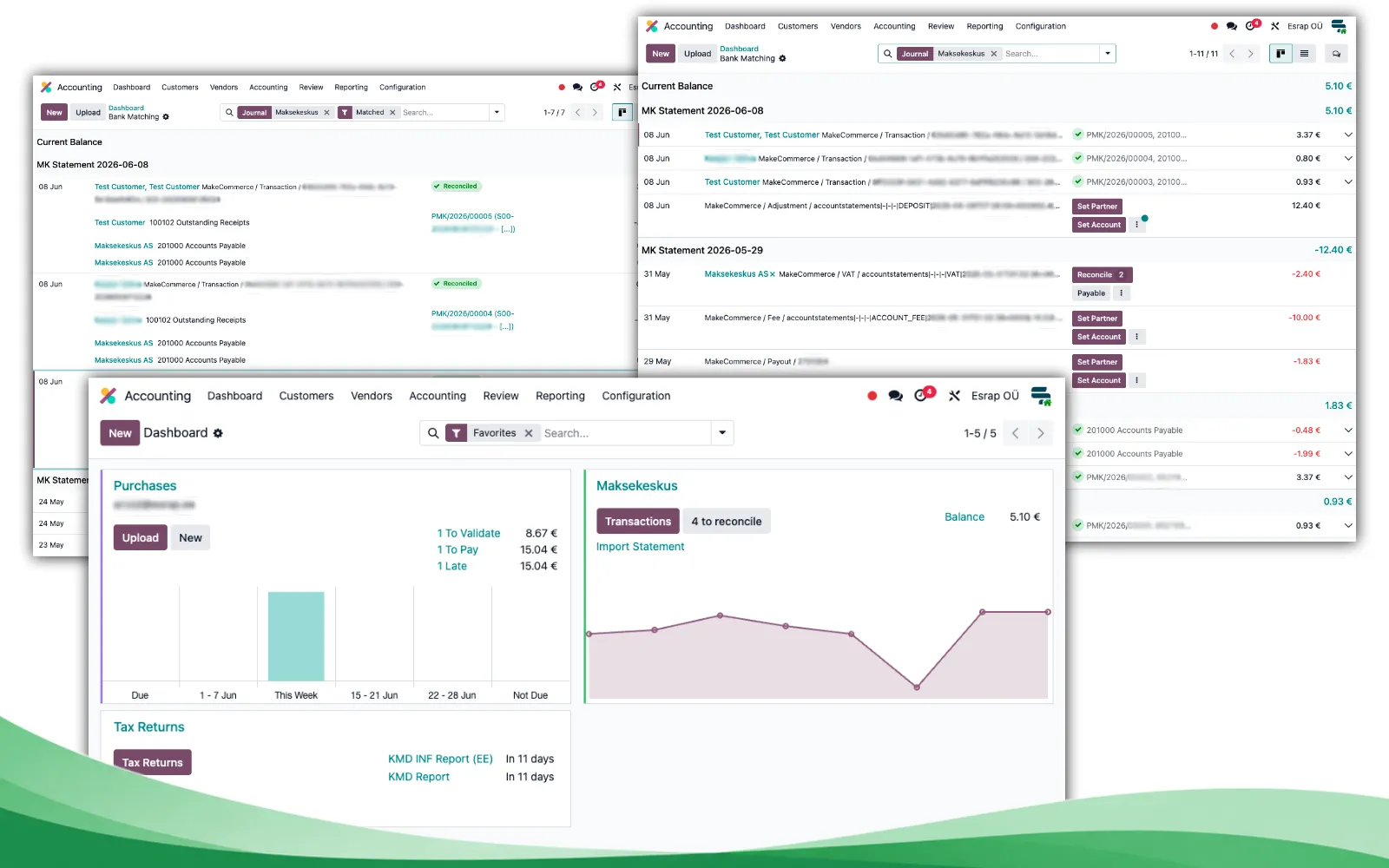
From a consolidated payout to transaction-level checks in Odoo Accounting
Online shop and POS sales transactions already reside in Odoo together with the relevant customers, payments and underlying accounting data. Customer payments, service fees, refunds and payouts connected to those transactions move through MakeCommerce. Because service fees are deducted before money is paid to the merchant, the amount received in the bank account may not equal the total value of the sales transactions.
The MakeCommerce account can be treated as a separate settlement account in Odoo Accounting. Its statement shows which online shop and POS payments make up a payout and which amounts relate to service fees, refunds or other account movements. This makes it possible to follow the entire connection from a sale recorded in Odoo to the net payout received in the company's bank account.
Esrap's statement import module first brings MakeCommerce settlement data into an Odoo import batch and review view. Where possible, the module links lines to existing Odoo MakeCommerce payment transactions, but it does not immediately create bank statement lines or perform unchecked automatic reconciliation.
The accountant reviews the imported lines and checks the identified connections. If a payment or refund was made outside the Odoo payment flow and no Odoo payment transaction is found, it can be marked for manual matching. A line that does not need to be recorded in accounting or is unsuitable can be ignored with a reason.
Only after the review are Odoo bank statement lines created in the MakeCommerce journal, whose default account is used as a separate clearing account. Odoo's standard reconciliation tools can then be used to link the amounts to payments, invoices, internal transfers and the correct accounting accounts.
This allows a consolidated payout to be broken down into individual sales payments, service fees and refunds. With a higher transaction volume, this is considerably more practical for the accountant than checking only the net amount received in the bank account.
Which integrations does your business need?
The right solution does not begin by adopting all four integrations, but by mapping the business's sales channels and working processes. Four practical questions help determine the right selection.
- Do customers pay in the Odoo online shop, customer portal or through a payment link? In this case, the MakeCommerce payment solution is required to connect the online payment result to the correct Odoo order, invoice or payment transaction.
- Do online shop orders require a carrier or parcel locker to be selected? The Shipping+ integration adds delivery methods and parcel lockers to Odoo checkout and carries the customer's selection into the sales and inventory process.
- Does the business have a physical or mobile sales location? The SoftPOS integration enables a contactless payment to be initiated from Odoo POS and the payment result to return to the correct POS sale.
- Is MakeCommerce settlement checked in Odoo Accounting? The statement import module helps bring payments, service fees, refunds and payouts into a controlled Odoo accounting process.
One possible route is to begin with online shop payments and the Shipping+ integration. If the business later opens a physical sales location, Odoo POS and SoftPOS can be added. If accounting is moved to Odoo, controlled import of MakeCommerce statements can follow as the next stage.
Implementation can take place in stages. It is sensible to begin with the process that currently creates the most manual entry, checking or risk of errors. Technical dependencies between the selected components, the Odoo version and the configuration of MakeCommerce services are considered when implementation is planned. A technical dependency does not mean that the business must use all four solutions.
Where should you start with Odoo and MakeCommerce?
If Odoo is not yet familiar to you, begin with the overview of Odoo's capabilities. It provides an initial picture of how Odoo connects the online shop, POS, sales, inventory and accounting, and which functions your business could adopt first.
You can learn more about the MakeCommerce integrations for Odoo on Esrap's product pages.
- MakeCommerce payment solution for Odoo
- MakeCommerce Shipping+ integration for Odoo
- MakeCommerce statement import for Odoo Accounting
- Odoo POS SoftPOS card payment integration
To plan a physical sales location, use the POS solution configurator. For mobile sales, a pop-up shop or a compact Android POS, use the mobile POS configurator. The configurator helps map the software, devices, payment solution and required services, but its result is a starting point for planning the solution rather than a final implementation project.
Adopting Odoo begins by mapping the business's current sales and settlement process. First, identify the process that creates the most manual work or risk of errors. Then define the required Odoo applications, MakeCommerce integrations and devices, and check that the complete process is suitable. This provides the basis for agreeing the scope, testing and implementation plan for the first stage.
Esrap helps identify a suitable starting point and prepare a staged solution that reflects how the business actually organises its online shop, physical sales locations, deliveries and accounting.